
Collection
Remote Work
2026.09.20
Tools and Settings to Reduce Video Conference Fatigue
From meeting services to webcams, sound, and lighting, a practical product check
Video conference fatigue is not just about keeping the camera on for too long. It also includes interruptions in sound requiring the same words to be repeated, the stress of adjusting a dark screen, and the buildup of time as attendees who have no purpose wait for their turn to speak. Before changing apps or investing in expensive equipment, it's essential to confirm if the meeting is necessary and whether the participants and end time are clear.
This list compiles three real video conferencing services along with noise cancellation software, webcams, speakerphones, lighting, and headphones into a comprehensive meeting environment. It not only explains the functionalities of each product but also discusses recording consent, guest permissions, exposure to calls in open spaces, and the burden of prolonged wear. Prioritize a stable internet connection and clear audio over camera resolution, and add equipment one at a time after accurately identifying issues to avoid setting conflicts and unnecessary expenses.
This list compiles three real video conferencing services along with noise cancellation software, webcams, speakerphones, lighting, and headphones into a comprehensive meeting environment. It not only explains the functionalities of each product but also discusses recording consent, guest permissions, exposure to calls in open spaces, and the burden of prolonged wear. Prioritize a stable internet connection and clear audio over camera resolution, and add equipment one at a time after accurately identifying issues to avoid setting conflicts and unnecessary expenses.
Zoom Workplace
A collaboration service that provides video conferencing and screen sharing across various devices, along with breakout rooms and captioning features. It is widely used for customer meetings, training, and large remote meetings due to its easy link connection with external participants.
By keeping the default times short and noting the end times for each agenda in the invitation, and only specifying when camera usage is necessary, you can reduce screen fatigue and unnecessary waiting. It's advisable to begin your evaluation by checking the 'Meeting password, waiting room, and recording consent' items.
By keeping the default times short and noting the end times for each agenda in the invitation, and only specifying when camera usage is necessary, you can reduce screen fatigue and unnecessary waiting. It's advisable to begin your evaluation by checking the 'Meeting password, waiting room, and recording consent' items.
브랜드·제공사 Zoom
제품·서비스 분류 화상회의 서비스
추천 용도 외부 참가자가 많은 온라인 회의
핵심 기능 예약·소회의실·화면 공유·자막
도입 전 확인 회의 암호·대기실·녹화 동의를 확인
Google Meet
A video conferencing service that allows participation directly from a web browser and Google Calendar. It seamlessly connects shared document links with scheduled invitations, making it suitable for teams looking to reduce separate installations.
Efficiently open shared documents during the meeting to note decisions and assignees, and ensure to reshare the meeting recording location with the attendees afterward to avoid leaving only chat messages behind. The key point to check before linking it to actual work is to confirm 'differences in recording and participant numbers based on organizational pricing plans.'
Efficiently open shared documents during the meeting to note decisions and assignees, and ensure to reshare the meeting recording location with the attendees afterward to avoid leaving only chat messages behind. The key point to check before linking it to actual work is to confirm 'differences in recording and participant numbers based on organizational pricing plans.'
브랜드·제공사 Google Workspace
제품·서비스 분류 브라우저 화상회의
추천 용도 Google 캘린더와 문서 중심 조직
핵심 기능 브라우저 참여·자막·화면 공유
도입 전 확인 조직 요금제별 녹화·참가 인원 차이 확인
Microsoft Teams Meetings
An online meeting feature that connects Outlook schedules, Teams chat, and Microsoft 365 files before and after meetings. It suits corporate environments looking to manage participants, materials, and follow-up discussions within the organizational account and security policies.
To prevent document buildup in ongoing meeting chats, establish storage locations for official meeting minutes and files, and check the scope visible to guests before inviting them. When comparing official guidelines and usage environments, prioritize checking 'guest permissions and recording storage location.'
To prevent document buildup in ongoing meeting chats, establish storage locations for official meeting minutes and files, and check the scope visible to guests before inviting them. When comparing official guidelines and usage environments, prioritize checking 'guest permissions and recording storage location.'
브랜드·제공사 Microsoft
제품·서비스 분류 기업용 화상회의
추천 용도 Microsoft 365 계정과 회의 자료 연결
핵심 기능 일정·회의·채팅·파일 연동
도입 전 확인 게스트 권한과 녹화 보관 위치 확인
Krisp
Software that reduces background noise and echoes between the microphone and speaker. It helps clarify what the other party hears in remote or shared spaces where keyboard sounds and conversations mix.
Be cautious not to overly apply noise cancellation as it may make voices sound artificial. It's best to record a test before important meetings and check for redundancy in the processing features of the primary meeting app. Before deciding on purchase or subscription, first check 'company security policies and supported apps/pricing plans.'
Be cautious not to overly apply noise cancellation as it may make voices sound artificial. It's best to record a test before important meetings and check for redundancy in the processing features of the primary meeting app. Before deciding on purchase or subscription, first check 'company security policies and supported apps/pricing plans.'
브랜드·제공사 Krisp
제품·서비스 분류 AI 소음 제거 소프트웨어
추천 용도 생활 소음이 있는 공간의 통화
핵심 기능 마이크·스피커 배경 소음 제거
도입 전 확인 회사 보안 정책과 지원 앱·요금제 확인
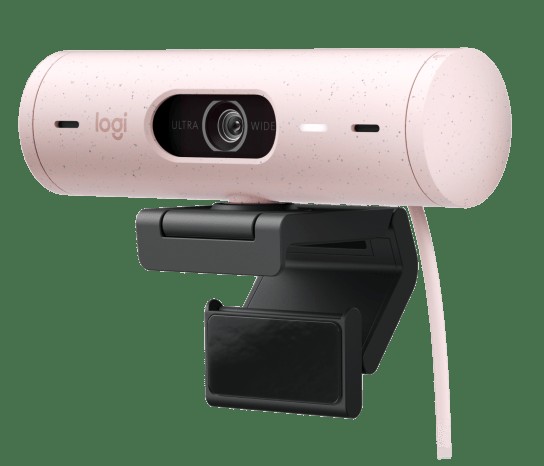
Logitech Brio 500
A USB webcam that provides Full HD video, automatic lighting adjustment, and framing features. It allows for camera placement at eye level or showcasing desk materials without being constrained by laptop screen angles.
Rather than increasing resolution, it’s more effective to align the lens with eye level and position windows directly or diagonally, while lowering the brightness to avoid excessive contrast with ambient lighting. During the testing phase, it's crucial not to overlook 'operating system and meeting app compatibility and installation height.'
Rather than increasing resolution, it’s more effective to align the lens with eye level and position windows directly or diagonally, while lowering the brightness to avoid excessive contrast with ambient lighting. During the testing phase, it's crucial not to overlook 'operating system and meeting app compatibility and installation height.'
브랜드 Logitech
잘 맞는 상황 일반적인 개인 화상회의에서 설치와 조작을 단순하게 유지하는 경우
핵심 특징 1080p 영상과 Show Mode·화각 조절
연결·호환 USB-C 연결과 Logi Tune 지원 운영체제 확인
구매 전 확인 모니터 장착 방식과 필요한 USB 변환 어댑터
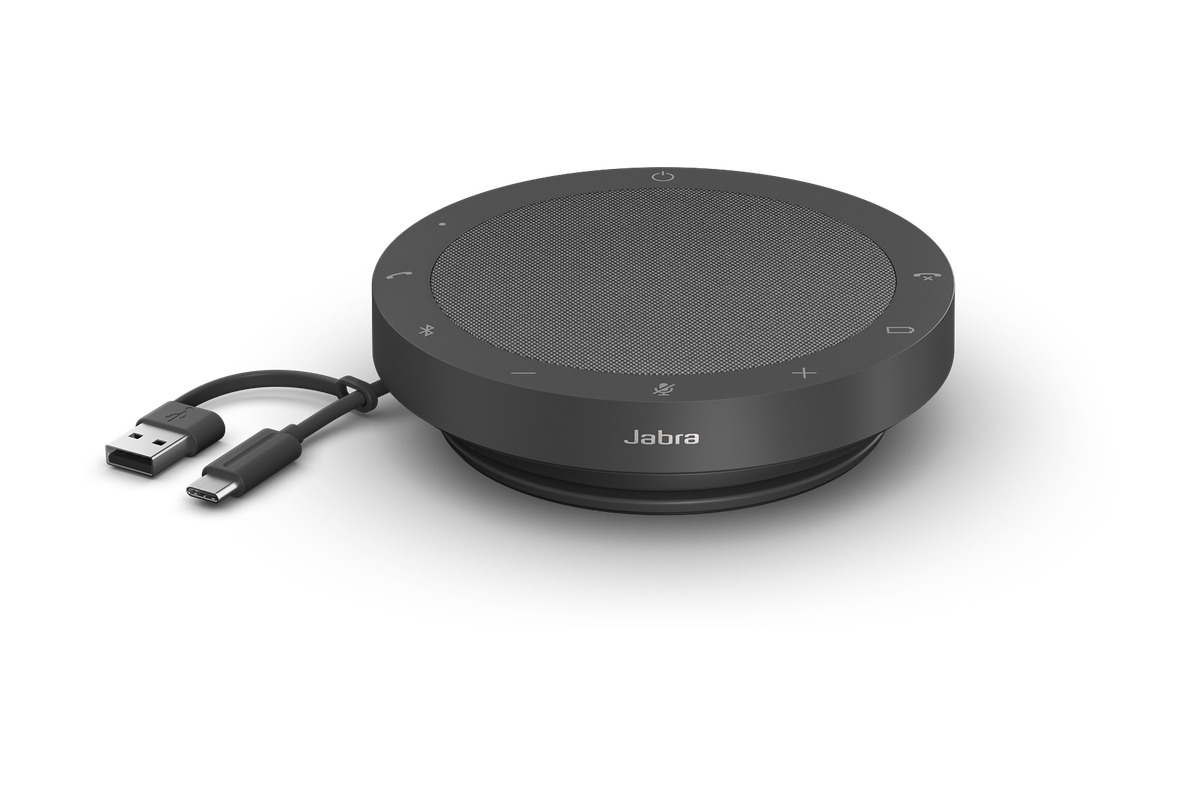
Jabra Speak2 55
A portable conference speakerphone that integrates a microphone and speaker, connecting via USB or Bluetooth. It's suitable for situations where you want to speak and listen without headset pressure in solo or small room settings.
Avoid using it in cafes or shared seating where conversation contents can be heard by others, and adjust its position and volume at home to minimize echoes from walls and solid desks. There needs to be a verification process to ensure 'care regarding exposure of call contents in open spaces' aligns with your working environment.
Avoid using it in cafes or shared seating where conversation contents can be heard by others, and adjust its position and volume at home to minimize echoes from walls and solid desks. There needs to be a verification process to ensure 'care regarding exposure of call contents in open spaces' aligns with your working environment.
브랜드 Jabra
잘 맞는 상황 소규모 테이블 회의와 출장지의 그룹 통화
핵심 특징 다중 마이크와 USB·Bluetooth 연결
연결·호환 UC·Teams 변형과 PC·모바일 연결 방식 확인
구매 전 확인 참석 인원·테이블 크기와 동글 포함 여부
Elgato Key Light Air
A lighting stand that combines a diffused LED panel with adjustable brightness and color temperature. It minimizes facial shadows caused by ceiling lights and backlighting from windows, reducing camera exposure changes.
Instead of placing it straight behind the screen, position it slightly higher and to the side of the camera, and start with low brightness that closely matches the surrounding lighting for comfort. The first thing to check during the selection process is 'placement at a diagonal next to the camera to avoid glare.'
Instead of placing it straight behind the screen, position it slightly higher and to the side of the camera, and start with low brightness that closely matches the surrounding lighting for comfort. The first thing to check during the selection process is 'placement at a diagonal next to the camera to avoid glare.'
브랜드·제공사 Elgato
제품·서비스 분류 데스크 조명
추천 용도 저녁 회의와 역광 보정
핵심 기능 밝기·색온도 조절과 앱 제어
도입 전 확인 눈부심을 피하도록 카메라 옆 사선에 배치
Sony WH-1000XM5
Over-ear headphones equipped with active noise cancellation, a microphone for calls, and wireless connectivity. They can be utilized to reduce background noise and clearly hear meeting audio while focusing on listening before and after work.
Noise cancellation does not replace safety during walking or outdoor movement, and during long meetings, take breaks to alleviate warmth and pressure on your ears while keeping the volume low. As a final comparison criterion, you can use the 'test for prolonged pressure discomfort and multipoint functionality.'
Noise cancellation does not replace safety during walking or outdoor movement, and during long meetings, take breaks to alleviate warmth and pressure on your ears while keeping the volume low. As a final comparison criterion, you can use the 'test for prolonged pressure discomfort and multipoint functionality.'
브랜드·제공사 Sony
제품·서비스 분류 무선 노이즈 캔슬링 헤드폰
추천 용도 집중 청취와 이동 중 회의
핵심 기능 능동 소음 제거·빔포밍 마이크
도입 전 확인 장시간 압박감과 멀티포인트 동작을 시험
If there are many external participants, Zoom or Google Meet with Google Calendar and document sharing feels natural, or if you're in a Microsoft 365 environment, Teams Meetings will work seamlessly. For background noise, consider Krisp; for laptop screen angle issues, take a look at the Brio 500, and if a headset is cumbersome in personal spaces, the Speak2 55 can be a suitable option. The Key Light Air can help balance backlighting, and the WH-1000XM5 is helpful for focused listening while on the go, but they are not essentials in every scenario.
The most effective improvement is to reduce a 50-minute meeting to 25 minutes and write deciding questions on the invitation. Test the microphone and screen sharing before the meeting and agree only on the segments that require camera usage. Before concluding, verify decisions, assign roles, and deadlines out loud, and document them in a shared file to minimize the need for future meetings. Only use recording and AI meeting notes with attendees' awareness and in accordance with your company's preservation and privacy policies.
The most effective improvement is to reduce a 50-minute meeting to 25 minutes and write deciding questions on the invitation. Test the microphone and screen sharing before the meeting and agree only on the segments that require camera usage. Before concluding, verify decisions, assign roles, and deadlines out loud, and document them in a shared file to minimize the need for future meetings. Only use recording and AI meeting notes with attendees' awareness and in accordance with your company's preservation and privacy policies.
At a glance
8 items
Zoom Workplace
Zoom화상회의 서비스예약·소회의실·화면 공유·자막
Google Meet
Google Workspace브라우저 화상회의브라우저 참여·자막·화면 공유
Microsoft Teams Meetings
Microsoft기업용 화상회의일정·회의·채팅·파일 연동
Krisp
KrispAI 소음 제거 소프트웨어생활 소음이 있는 공간의 통화
Logitech Brio 500
Logitech
Jabra Speak2 55
Jabra
Elgato Key Light Air
Elgato데스크 조명저녁 회의와 역광 보정
Sony WH-1000XM5
Sony무선 노이즈 캔슬링 헤드폰집중 청취와 이동 중 회의
As part of the Coupang Partners program, this post may earn a commission from qualifying purchases.
Comments 0
Log in to leave a comment.
Be the first to comment.
How about these lists?


You might also like


🎲
Not ready to stop here?
Wondering what to read next is the biggest waste of time.
Let the dice decide — you won't know what pops up until you roll.
If you don't press it… won't you wonder forever? 👀
