Collection
Remote Work
2026.09.20
Remote Work Routine for Staying Focused at Home
Connecting to-do lists, blocking, timers, and collaboration with real tools
It's harder to concentrate at home not due to a lack of willpower but because the signals that used to segment time, like commuting, moving to meetings, and finishing work, have disappeared. When messenger notifications, household chores, and checking websites all happen at the same desk, the lines for starting and ending work become blurred. Instead of installing many productivity apps, it’s more effective to create a signal for each of the three stages: selecting tasks, preventing interruptions, and taking breaks.
This list connects actual to-do services, focus timers and blocking apps, virtual collaboration, e-paper notebooks, and input devices to eight different routines. It does not assume that specific time techniques will work for everyone, and it also considers emergency contacts, company security policies, and physical adaptability. For the first week, focus not on increasing concentrated time but on recording when and why your flow was interrupted, and try reducing just the most common distraction.
This list connects actual to-do services, focus timers and blocking apps, virtual collaboration, e-paper notebooks, and input devices to eight different routines. It does not assume that specific time techniques will work for everyone, and it also considers emergency contacts, company security policies, and physical adaptability. For the first week, focus not on increasing concentrated time but on recording when and why your flow was interrupted, and try reducing just the most common distraction.
Todoist
A task management service that organizes work and personal tasks using projects, deadlines, and labels. It allows you to create starting and ending criteria for your day, even while working remotely without commuting signals, by utilizing natural language date inputs, recurring schedules, and filters.
Instead of sending all your thoughts to today, set aside time to categorize them in a collection. By differentiating between three core tasks for the day and short administrative tasks, you can reduce the feeling of pressure from your list. In the introduction phase, it’s advisable to first examine the criterion to ‘leave only the tasks you can actually finish today’.
Instead of sending all your thoughts to today, set aside time to categorize them in a collection. By differentiating between three core tasks for the day and short administrative tasks, you can reduce the feeling of pressure from your list. In the introduction phase, it’s advisable to first examine the criterion to ‘leave only the tasks you can actually finish today’.
브랜드·제공사 Doist
제품·서비스 분류 할 일 관리 서비스
추천 용도 하루 우선순위와 반복 업무 정리
핵심 기능 프로젝트·라벨·필터·반복 일정
도입 전 확인 오늘 목록에는 실제 끝낼 수 있는 수만 남기기
TickTick
A productivity service that offers to-do lists, calendars, habit tracking, and a Pomodoro timer all in one. By planning work blocks and breaks on the same screen, it can help clarify the blurred time boundaries when working from home.
Rather than just boosting statistical numbers, it’s better to first establish a routine that organizes leftover tasks after actual work is done and limit alerts to only those that lead to actions. The key to check before connecting to actual work is ‘not to turn on all features at once, but to add them week by week’.
Rather than just boosting statistical numbers, it’s better to first establish a routine that organizes leftover tasks after actual work is done and limit alerts to only those that lead to actions. The key to check before connecting to actual work is ‘not to turn on all features at once, but to add them week by week’.
브랜드·제공사 TickTick
제품·서비스 분류 할 일·습관·집중 타이머
추천 용도 일정과 포모도로를 한 앱에서 관리
핵심 기능 캘린더·습관·Pomodoro·통계
도입 전 확인 기능을 한꺼번에 켜지 말고 한 주 단위로 추가
Forest
A timer app that helps reduce smartphone checking by growing a virtual tree until your set focus time ends. It’s suitable for those who want to accumulate visible records of short work blocks.
If your job makes it hard to completely block messages, start from around 25 minutes rather than lengthy sessions, and with colleagues, set the rules for emergency contact exceptions and break times. When comparing official guides and usage environments, prioritize checking ‘not to set long times unreasonably and to verify blocking app settings.’
If your job makes it hard to completely block messages, start from around 25 minutes rather than lengthy sessions, and with colleagues, set the rules for emergency contact exceptions and break times. When comparing official guides and usage environments, prioritize checking ‘not to set long times unreasonably and to verify blocking app settings.’
브랜드·제공사 SEEKRTECH
제품·서비스 분류 집중 타이머 앱
추천 용도 휴대전화 사용을 줄인 짧은 집중
핵심 기능 집중 시간 동안 가상 나무 성장
도입 전 확인 긴 시간을 무리하게 잡지 말고 방해 앱 설정 확인
Freedom
A focus service that blocks selected websites and apps for a set amount of time while syncing sessions across multiple devices. Instead of relying on willpower to close tabs, it proactively prevents distractions to secure deep work time.
If you make the blocking list too broad, it could prevent access to necessary materials, so record actual distracting sites for a week before starting, and trial difficult lock settings for a short duration. Before deciding on a purchase or subscription, you should first check whether to ‘add necessary logins and contact channels to the exceptions list.’
If you make the blocking list too broad, it could prevent access to necessary materials, so record actual distracting sites for a week before starting, and trial difficult lock settings for a short duration. Before deciding on a purchase or subscription, you should first check whether to ‘add necessary logins and contact channels to the exceptions list.’
브랜드·제공사 Freedom
제품·서비스 분류 웹사이트·앱 차단 서비스
추천 용도 뉴스·SNS의 반복 확인 차단
핵심 기능 여러 기기 동시 차단 세션
도입 전 확인 업무에 필요한 로그인·연락 채널을 예외 목록에 추가
Focusmate
A virtual collaboration service where you connect with other users via video at scheduled times to declare your tasks and quietly work, sharing results afterward. It provides an external commitment for those who need a work-starting signal at home.
Adjust the camera angle so that confidential documents or family spaces are not visible on screen, and express shared goals with general task units instead of client names for safety. During the trial usage phase, it’s essential to remember not to overlook ‘camera visibility range and personal information exposure caution.’
Adjust the camera angle so that confidential documents or family spaces are not visible on screen, and express shared goals with general task units instead of client names for safety. During the trial usage phase, it’s essential to remember not to overlook ‘camera visibility range and personal information exposure caution.’
브랜드·제공사 Focusmate
제품·서비스 분류 온라인 집중 동반 서비스
추천 용도 혼자 시작하기 어려운 업무 세션
핵심 기능 예약된 1대1 가상 공동 작업
도입 전 확인 카메라 공개 범위와 개인정보 노출 주의
Time Timer MOD
A desk visual timer that displays the remaining time as a colored disk. It’s useful for reducing online notifications as you can check the end of focus blocks and breaks without opening the app window.
Instead of stopping work immediately when the timer rings, record your current position in a line before taking a break, which makes returning easier. Initially, observe your body’s response with short cycles like 25 minutes of work and 5 minutes of break. Before incorporating it into your work environment, it’s necessary to confirm that the conditions ‘sound levels and timer ranges fit your working style’.
Instead of stopping work immediately when the timer rings, record your current position in a line before taking a break, which makes returning easier. Initially, observe your body’s response with short cycles like 25 minutes of work and 5 minutes of break. Before incorporating it into your work environment, it’s necessary to confirm that the conditions ‘sound levels and timer ranges fit your working style’.
브랜드·제공사 Time Timer
제품·서비스 분류 시각 타이머
추천 용도 화면 밖에서 남은 시간을 확인
핵심 기능 색 원판으로 남은 시간 표시
도입 전 확인 소리 크기와 타이머 범위를 작업 방식에 맞춤
reMarkable 2
A digital notebook designed to focus on writing and PDF annotation using an electronic paper screen and stylus input. With fewer app notifications than a regular tablet, it’s great for separating ideas and meeting notes from the work screen.
First, check if confidential data can be uploaded to a personal cloud according to company policy, and standardize notes by date and project name to make them easy to find when transferring to a work system. The first aspect to confirm during the selection process is ‘sync plans and company document export policies.’
First, check if confidential data can be uploaded to a personal cloud according to company policy, and standardize notes by date and project name to make them easy to find when transferring to a work system. The first aspect to confirm during the selection process is ‘sync plans and company document export policies.’
브랜드·제공사 reMarkable
제품·서비스 분류 전자 종이 노트
추천 용도 알림 없이 회의 메모와 초안 작성
핵심 기능 필기·PDF 주석·클라우드 동기화
도입 전 확인 동기화 요금제와 회사 문서 반출 정책 확인
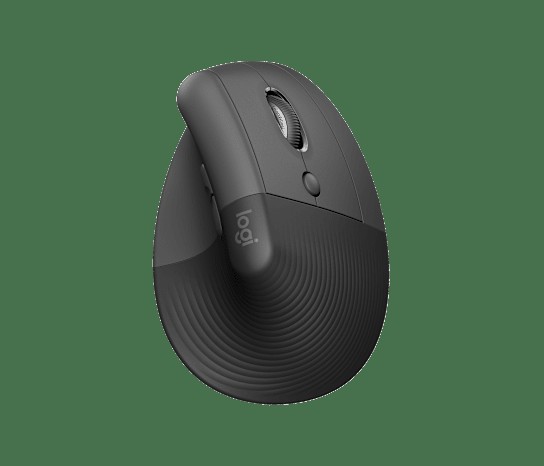
Logitech Lift Vertical Ergonomic Mouse
Logitech Lift
A wireless vertical mouse designed with a slanted shape to reduce the angle of wrist strain. It becomes a better option for changing hand posture in remote work environments that require long pointer usage, such as document editing and design.
Gradually extend the usage time as you adapt to the new posture, and rather than just changing the mouse, adjust the height of your elbow, the depth of your desk, and the pointer speed as well. As a final comparison criterion, you can refer to the ‘size of the hand, left/right model, and connection type’.
Gradually extend the usage time as you adapt to the new posture, and rather than just changing the mouse, adjust the height of your elbow, the depth of your desk, and the pointer speed as well. As a final comparison criterion, you can refer to the ‘size of the hand, left/right model, and connection type’.
브랜드 Logitech
잘 맞는 상황 일반 마우스를 비틀어 잡는 느낌을 줄이고 싶은 작은·중간 손
핵심 특징 57도 그립과 저소음 클릭
연결·호환 Bluetooth 또는 Logi Bolt, 좌·우손 모델 구분
구매 전 확인 손 크기 가이드와 원하는 손 방향 모델
Limit your choices for the day with Todoist or TickTick, and create short focus signals with Forest or Time Timer MOD. Block frequently opened websites with Freedom, and if you find it hard to start working alone, utilize reservations on Focusmate like external appointments. The reMarkable 2 offers a notification-free drafting space, while Logitech Lift provides an option for improving pointer work posture, but be sure to check the company’s document policies and hand adaptability first.
Routines are built from the repetition of starting and ending rather than a perfect timetable. Before starting work, write down three outcomes you want to finish today, and after a focus block ends, leave a line for the next action before getting up. At quitting time, move any unfinished items to the next day or project list and change your messenger status to offline. When statistics and ongoing records become more important than actual outcomes, it’s better to reduce tools and first adjust fundamental conditions like sleep, rest, and workload.
Routines are built from the repetition of starting and ending rather than a perfect timetable. Before starting work, write down three outcomes you want to finish today, and after a focus block ends, leave a line for the next action before getting up. At quitting time, move any unfinished items to the next day or project list and change your messenger status to offline. When statistics and ongoing records become more important than actual outcomes, it’s better to reduce tools and first adjust fundamental conditions like sleep, rest, and workload.
At a glance
8 items
Todoist
Doist할 일 관리 서비스프로젝트·라벨·필터·반복 일정
TickTick
TickTick할 일·습관·집중 타이머
Forest
SEEKRTECH집중 타이머 앱
Freedom
Freedom웹사이트·앱 차단 서비스뉴스·SNS의 반복 확인 차단
Focusmate
Focusmate온라인 집중 동반 서비스예약된 1대1 가상 공동 작업
Time Timer MOD
Time Timer시각 타이머화면 밖에서 남은 시간을 확인
reMarkable 2
reMarkable전자 종이 노트
Logitech Lift Vertical Ergonomic Mouse
Logitech57도 그립과 저소음 클릭
As part of the Coupang Partners program, this post may earn a commission from qualifying purchases.
Comments 0
Log in to leave a comment.
Be the first to comment.
How about these lists?


You might also like


🎲
Not ready to stop here?
Wondering what to read next is the biggest waste of time.
Let the dice decide — you won't know what pops up until you roll.
If you don't press it… won't you wonder forever? 👀