
Collection
Remote Work Equipment
2026.10.11
Input Devices That Rethink Your Wrists and Posture on Long Typing Days
A remote-work desk comparing curved keyboards, vertical mice, and trackballs through real products
When your wrists feel uncomfortable at a remote-work desk, swapping products right away based only on the word 'ergonomic' in the name often leads to results that differ from expectations. A keyboard with keys split left and right changes the position of your shoulders and arms but needs an adjustment period, and a vertical mouse reduces wrist rotation only if your hand size and the button placement match. If you change only the input devices while leaving the height of your existing equipment and the chair-to-desk spacing as they are, the cause of the problem may remain.
This list looks at curved and split keyboards, vertical mice, and trackballs separately, through real products. For each item, we've flagged the conditions that are hard to reverse after purchase, such as whether you need a number pad, hand size, operating system, Bluetooth versus USB receiver, and wired connection. It isn't a list of devices that treat pain; it works best as a comparison table for narrowing down candidates to test the posture and input style that suits you.
This list looks at curved and split keyboards, vertical mice, and trackballs separately, through real products. For each item, we've flagged the conditions that are hard to reverse after purchase, such as whether you need a number pad, hand size, operating system, Bluetooth versus USB receiver, and wired connection. It isn't a list of devices that treat pain; it works best as a comparison table for narrowing down candidates to test the posture and input style that suits you.
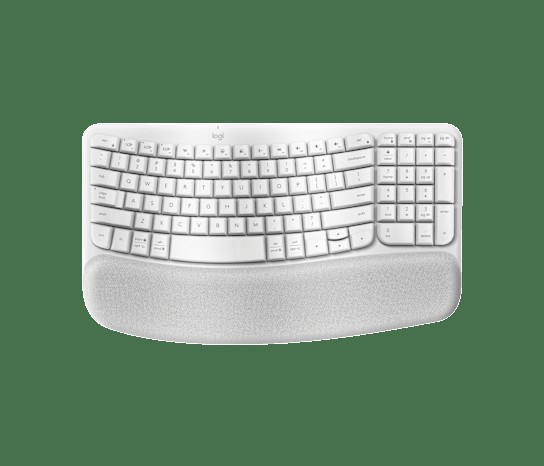
Logitech Wave Keys
In the 'Input Devices That Rethink Your Wrists and Posture on Long Typing Days' list, the Logitech Wave Keys is a wireless keyboard with a wave-shaped key frame and an integrated cushioned palm rest. When you take 'wanting to shift hand position gently while keeping a familiar one-piece layout' as the benchmark use case, the role of the Logitech Wave Keys comes into sharp focus. The key items are the 'curved key layout and switching among three devices.' Since the experience changes with desk size and hours of use per day, you should also look at where the Logitech Wave Keys will sit.
Before adopting it, check 'confirming the support range, such as Bluetooth or Logi Bolt and Windows and macOS' first, and at the ordering stage, cross-check 'the key layout for your sales region and whether a Logi Bolt receiver is included' against the Logitech Wave Keys's official page and the retail model designation as well. When viewing the Logitech Wave Keys as a selection criterion in the 'Input Devices That Rethink Your Wrists and Posture on Long Typing Days' list, don't isolate a single advantage; it's better to make the final call with Logitech's support coverage and your actual work habits side by side.
Before adopting it, check 'confirming the support range, such as Bluetooth or Logi Bolt and Windows and macOS' first, and at the ordering stage, cross-check 'the key layout for your sales region and whether a Logi Bolt receiver is included' against the Logitech Wave Keys's official page and the retail model designation as well. When viewing the Logitech Wave Keys as a selection criterion in the 'Input Devices That Rethink Your Wrists and Posture on Long Typing Days' list, don't isolate a single advantage; it's better to make the final call with Logitech's support coverage and your actual work habits side by side.
브랜드 Logitech
잘 맞는 상황 익숙한 일체형 배열을 유지하면서 손 위치를 완만하게 바꾸고 싶은 경우
핵심 특징 곡선형 키 배열과 3대 기기 전환
연결·호환 Bluetooth 또는 Logi Bolt, Windows·macOS 등 지원 범위 확인
구매 전 확인 판매 지역의 키 배열과 Logi Bolt 수신기 포함 여부
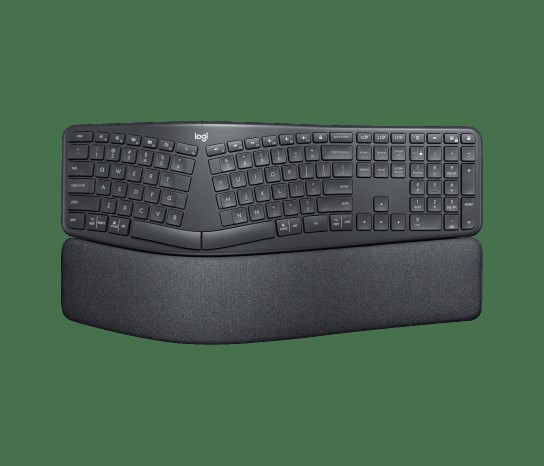
Logitech ERGO K860
In the 'Input Devices That Rethink Your Wrists and Posture on Long Typing Days' list, the Logitech ERGO K860 is a full-size keyboard that combines a curved, split key frame with an adjustable-height palm lift. The Logitech ERGO K860 is worth comparing first for desks that need 'a desk with room to adapt to a split layout while still using a number pad.' The first specs to look at on the Logitech ERGO K860 are the 'fixed split key frame and integrated palm rest,' and you should compare whether these features actually reduce the discomfort of your existing equipment.
The conditions to check before paying for the Logitech ERGO K860 are 'confirming Bluetooth or the USB receiver and supported operating systems.' The 'keyboard width, English layout, and palm lift direction' should also be checked before the parts arrive. In the end, the value of the Logitech ERGO K860 depends on whether there's a feature you'll clearly use often in your 'Input Devices That Rethink Your Wrists and Posture on Long Typing Days' environment, so confirm Logitech's warranty coverage and then decide whether it replaces or supplements your existing equipment.
The conditions to check before paying for the Logitech ERGO K860 are 'confirming Bluetooth or the USB receiver and supported operating systems.' The 'keyboard width, English layout, and palm lift direction' should also be checked before the parts arrive. In the end, the value of the Logitech ERGO K860 depends on whether there's a feature you'll clearly use often in your 'Input Devices That Rethink Your Wrists and Posture on Long Typing Days' environment, so confirm Logitech's warranty coverage and then decide whether it replaces or supplements your existing equipment.
브랜드 Logitech
잘 맞는 상황 숫자패드를 쓰면서 분할형 배열에 적응할 공간이 있는 책상
핵심 특징 고정형 분할 키 프레임과 일체형 손목 받침
연결·호환 Bluetooth 또는 USB 수신기와 지원 운영체제 확인
구매 전 확인 키보드 폭·영문 배열·팜 리프트 방향
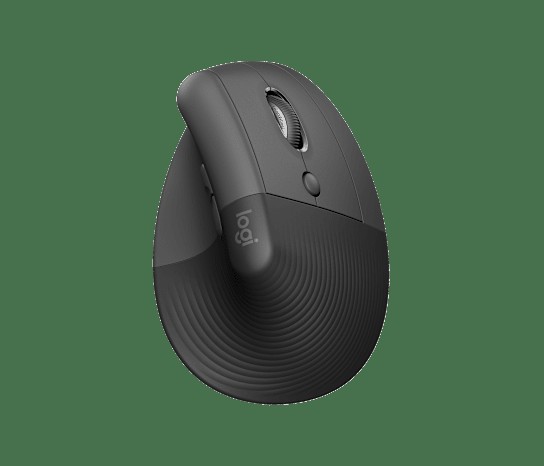
Logitech Lift
Logitech Lift Vertical Ergonomic Mouse
In the 'Input Devices That Rethink Your Wrists and Posture on Long Typing Days' list, the Logitech Lift Vertical Ergonomic Mouse is a 57-degree vertical wireless mouse designed for small to medium-sized hands. The reason this product made the list is that it ties in with 'small or medium hands that want less of the twisted grip of a regular mouse.' The Logitech Lift Vertical Ergonomic Mouse's signature advantage is its '57-degree grip and quiet clicks,' but if it doesn't match your work habits, you may end up using it less.
To reduce setup failures, review the Logitech Lift Vertical Ergonomic Mouse's 'Bluetooth or Logi Bolt and the distinction between left- and right-handed models,' then recheck 'the hand size guide and the model for your preferred hand' against the retailer's description. To complete your 'Input Devices That Rethink Your Wrists and Posture on Long Typing Days' setup, look not only at the Logitech Lift Vertical Ergonomic Mouse's convenience but also at the conditions that are hard to reverse after installation, and compare Logitech's support policy with your own work sequence.
To reduce setup failures, review the Logitech Lift Vertical Ergonomic Mouse's 'Bluetooth or Logi Bolt and the distinction between left- and right-handed models,' then recheck 'the hand size guide and the model for your preferred hand' against the retailer's description. To complete your 'Input Devices That Rethink Your Wrists and Posture on Long Typing Days' setup, look not only at the Logitech Lift Vertical Ergonomic Mouse's convenience but also at the conditions that are hard to reverse after installation, and compare Logitech's support policy with your own work sequence.
브랜드 Logitech
잘 맞는 상황 일반 마우스를 비틀어 잡는 느낌을 줄이고 싶은 작은·중간 손
핵심 특징 57도 그립과 저소음 클릭
연결·호환 Bluetooth 또는 Logi Bolt, 좌·우손 모델 구분
구매 전 확인 손 크기 가이드와 원하는 손 방향 모델
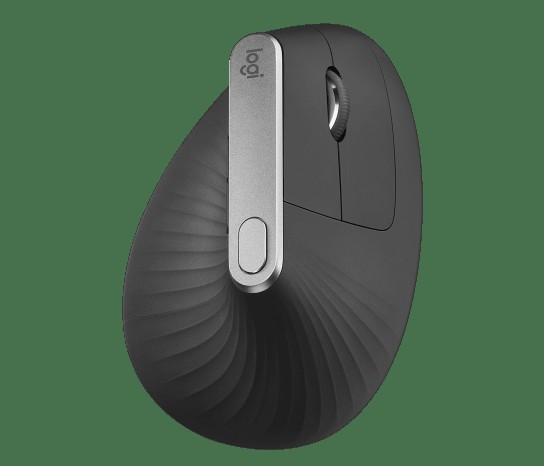
Logitech MX Vertical
In the 'Input Devices That Rethink Your Wrists and Posture on Long Typing Days' list, the Logitech MX Vertical is a vertical mouse with a 57-degree shape suited to large hands and a rechargeable battery. The Logitech MX Vertical's usefulness shows most clearly when solving the 'medium to large hands that can wrap securely around a tall body' situation. For the Logitech MX Vertical's '57-degree grip and USB-C charging,' how often they get used in your everyday work sequence matters more than the peak figures.
The Logitech MX Vertical's range of use changes depending on the 'confirming support for Bluetooth, the receiver, and a wired USB-C connection' conditions, and 'body height, portability, and fit for your hand size' are also hard to change after purchase. The Logitech MX Vertical is a candidate that reduces a specific discomfort in the 'Input Devices That Rethink Your Wrists and Posture on Long Typing Days' list, not the right answer for every environment, so check Logitech's support coverage and your actual frequency of use and spend only on the features you need.
The Logitech MX Vertical's range of use changes depending on the 'confirming support for Bluetooth, the receiver, and a wired USB-C connection' conditions, and 'body height, portability, and fit for your hand size' are also hard to change after purchase. The Logitech MX Vertical is a candidate that reduces a specific discomfort in the 'Input Devices That Rethink Your Wrists and Posture on Long Typing Days' list, not the right answer for every environment, so check Logitech's support coverage and your actual frequency of use and spend only on the features you need.
브랜드 Logitech
잘 맞는 상황 높은 본체를 안정적으로 감쌀 수 있는 중간·큰 손
핵심 특징 57도 그립과 USB-C 충전
연결·호환 Bluetooth·수신기·USB-C 유선 연결 지원 여부 확인
구매 전 확인 본체 높이와 휴대성, 손 크기 적합성
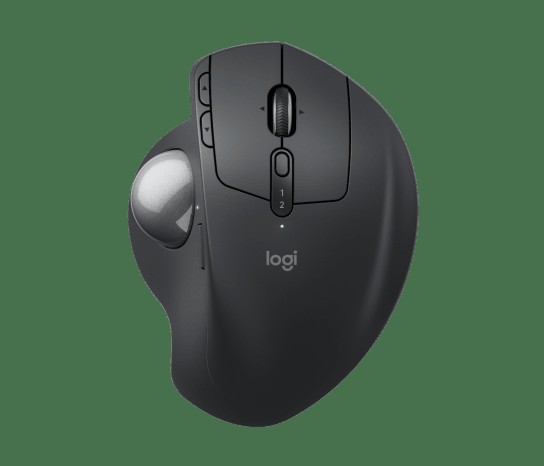
Logitech MX Ergo S
In the 'Input Devices That Rethink Your Wrists and Posture on Long Typing Days' list, the Logitech MX Ergo S is a wireless input device that moves the pointer with a thumb trackball without moving the body itself. The selection criteria become clearer when you place it in the context of 'a user with little room to move a mouse who suits the thumb trackball style' rather than simply looking at spec-sheet numbers. In the comparison process, it's realistic to judge the Logitech MX Ergo S's 'tilt-adjustable body and precision mode' side by side with your current desk configuration.
Before keeping the Logitech MX Ergo S on your shopping list, checking 'Bluetooth and Logi Bolt connectivity and confirming software support' and then 'the strain on the thumb, the cleaning method, and handedness' in turn can reduce unnecessary returns. When evaluating the Logitech MX Ergo S from the 'Input Devices That Rethink Your Wrists and Posture on Long Typing Days' perspective, what matters is how much it simplifies the tasks you repeat every day rather than the number of features, and it becomes a choice that lasts only when Logitech's after-sales support and your desk environment line up as well.
Before keeping the Logitech MX Ergo S on your shopping list, checking 'Bluetooth and Logi Bolt connectivity and confirming software support' and then 'the strain on the thumb, the cleaning method, and handedness' in turn can reduce unnecessary returns. When evaluating the Logitech MX Ergo S from the 'Input Devices That Rethink Your Wrists and Posture on Long Typing Days' perspective, what matters is how much it simplifies the tasks you repeat every day rather than the number of features, and it becomes a choice that lasts only when Logitech's after-sales support and your desk environment line up as well.
브랜드 Logitech
잘 맞는 상황 마우스를 움직일 공간이 좁고 엄지 트랙볼 방식이 맞는 사용자
핵심 특징 기울기 조절 본체와 정밀 모드
연결·호환 Bluetooth와 Logi Bolt 연결, 소프트웨어 지원 확인
구매 전 확인 엄지 사용 부담과 청소 방법, 손 방향
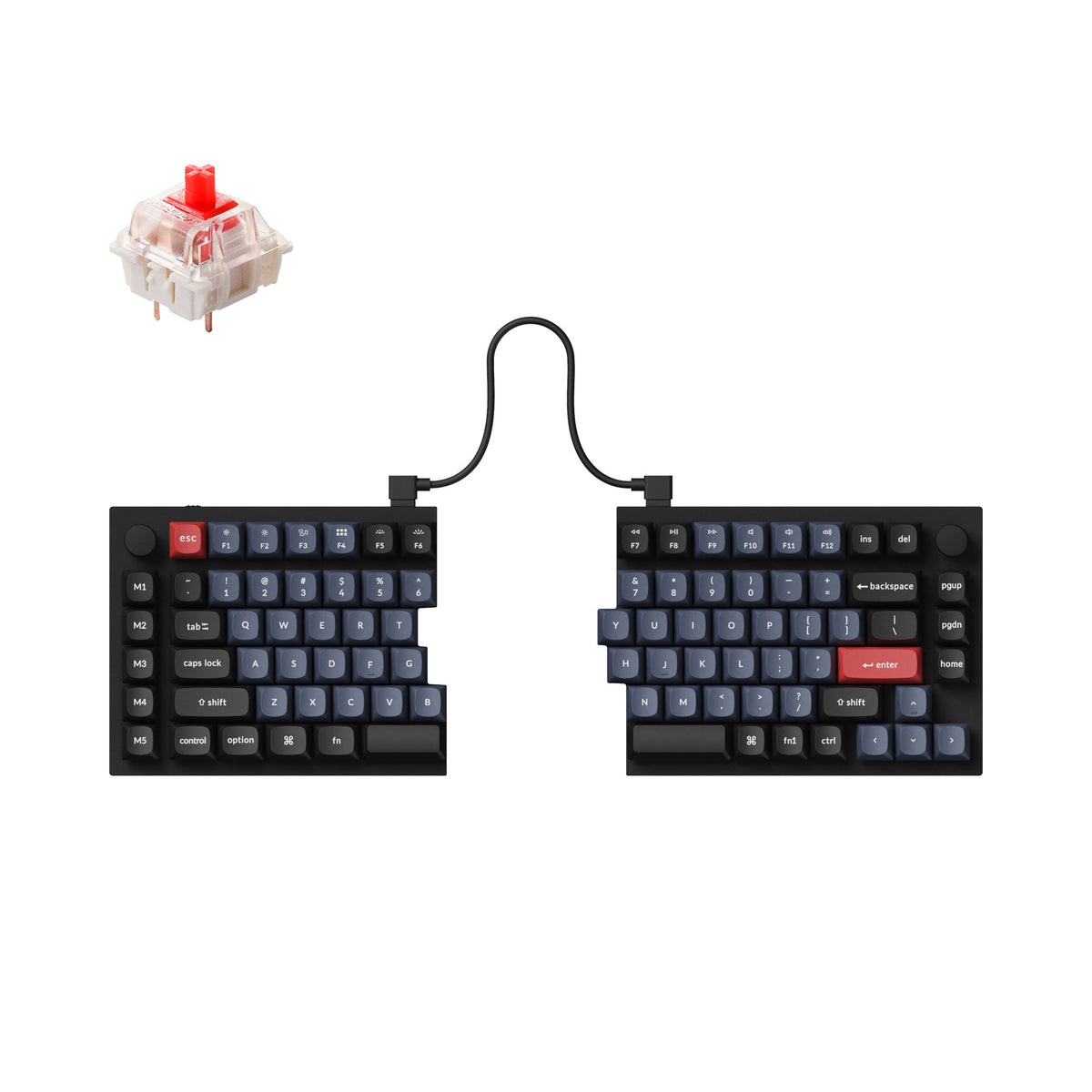
Keychron Q11 QMK Custom Mechanical Keyboard
In the 'Input Devices That Rethink Your Wrists and Posture on Long Typing Days' list, the Keychron Q11 QMK Custom Mechanical Keyboard is a wired split mechanical keyboard whose left and right halves can be placed apart. When reviewing the Keychron Q11 QMK Custom Mechanical Keyboard, it's best to start from the actual workflow in which 'wanting to adjust the distance and angle between the two halves of the keyboard yourself to match your shoulder width' comes up. The 'fully split aluminum body and QMK/VIA' that the Keychron Q11 QMK Custom Mechanical Keyboard provides only do their job when the placement and surrounding equipment line up.
Whether the Keychron Q11 QMK Custom Mechanical Keyboard gets real use hinges on the 'wired USB-C connection, operating system switching, and confirming the keymap tools' conditions, so it's safer to verify even 'the distinction between fully assembled and barebone versions and the switch and keycap configuration' in official documents. Before the final choice, sum up in one sentence the role the Keychron Q11 QMK Custom Mechanical Keyboard will play in your 'Input Devices That Rethink Your Wrists and Posture on Long Typing Days' setup, and raise its purchase priority when that role is clear and Keychron's support terms also make sense to you.
Whether the Keychron Q11 QMK Custom Mechanical Keyboard gets real use hinges on the 'wired USB-C connection, operating system switching, and confirming the keymap tools' conditions, so it's safer to verify even 'the distinction between fully assembled and barebone versions and the switch and keycap configuration' in official documents. Before the final choice, sum up in one sentence the role the Keychron Q11 QMK Custom Mechanical Keyboard will play in your 'Input Devices That Rethink Your Wrists and Posture on Long Typing Days' setup, and raise its purchase priority when that role is clear and Keychron's support terms also make sense to you.
브랜드 Keychron
잘 맞는 상황 어깨 폭에 맞춰 키보드 두 부분의 거리와 각도를 직접 조절하려는 경우
핵심 특징 완전 분리형 알루미늄 본체와 QMK/VIA
연결·호환 USB-C 유선 연결과 운영체제 전환, 키맵 도구 확인
구매 전 확인 완제품·베어본 구분과 스위치·키캡 구성
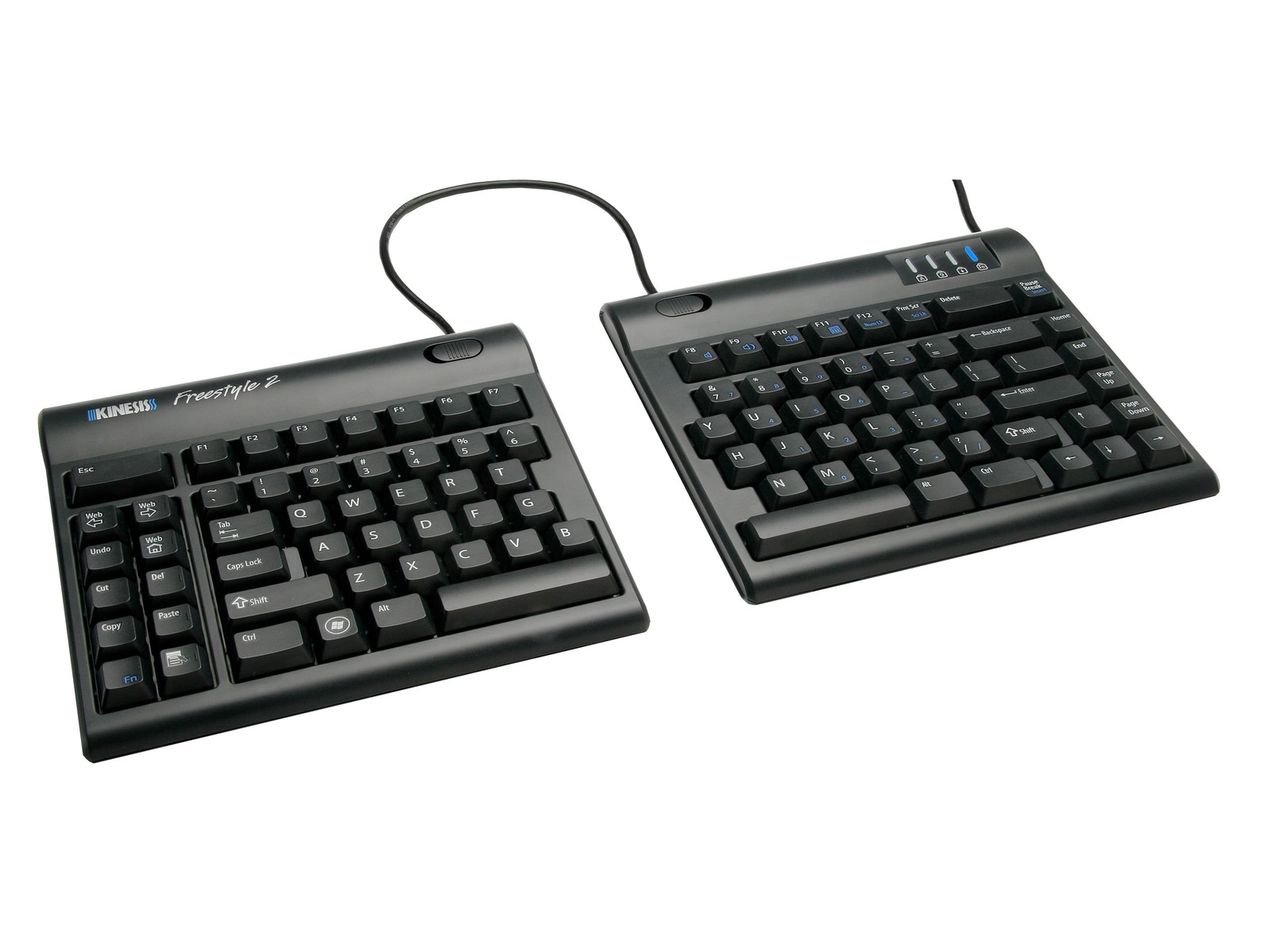
Kinesis Freestyle2
In the 'Input Devices That Rethink Your Wrists and Posture on Long Typing Days' list, the Kinesis Freestyle2 is a wired split keyboard whose thin left and right modules are joined by a cable so they can be spread apart. If your situation matches 'a desk that prioritizes a low height and adjustable split width over mechanical key feel,' there's a solid reason to put the Kinesis Freestyle2 on your shortlist. Keep in mind, too, that if you don't need the 'low profile and two separable modules,' a simpler product than the Kinesis Freestyle2 may be the more sensible choice.
To bring the Kinesis Freestyle2 into your current environment, the 'wired USB connection and distinguishing the PC or Mac model and cable length' conditions have to be met, and treat 'whether the lift accessory is included and the English layout' as the final criterion for choosing a model. Whether the Kinesis Freestyle2 stays on the 'Input Devices That Rethink Your Wrists and Posture on Long Typing Days' list should be judged by whether it actually reduces your current discomfort rather than by how flashy its new features are, and Kinesis's warranty and exchange terms should be factored into the cost calculation as well.
To bring the Kinesis Freestyle2 into your current environment, the 'wired USB connection and distinguishing the PC or Mac model and cable length' conditions have to be met, and treat 'whether the lift accessory is included and the English layout' as the final criterion for choosing a model. Whether the Kinesis Freestyle2 stays on the 'Input Devices That Rethink Your Wrists and Posture on Long Typing Days' list should be judged by whether it actually reduces your current discomfort rather than by how flashy its new features are, and Kinesis's warranty and exchange terms should be factored into the cost calculation as well.
브랜드 Kinesis
잘 맞는 상황 기계식 키감보다 낮은 높이와 분리 폭 조절을 우선하는 책상
핵심 특징 낮은 프로파일과 분리 가능한 두 모듈
연결·호환 USB 유선 연결, PC·Mac 모델 및 케이블 길이 구분
구매 전 확인 리프트 액세서리 포함 여부와 영문 배열
Rather than replacing both keyboard and mouse from the start, testing the one device that bothers you most for a few days at a time makes it easier to tell what's driving the adjustment. Check together whether the front of the keyboard is so high that your wrists bend, whether you reach far to grab the mouse, and whether your elbows sit close to your torso. A wrist rest isn't meant to press on the wrist joint; it's closer to lightly supporting the base of your palms in the moments when you pause typing.
Even after choosing a product, short breaks and changes of posture are still needed. Persistent pain or numbness shouldn't be judged on equipment recommendations alone; consult a medical professional. For keyboards with overseas layouts, checking the Korean legends and the placement of the language toggle key, and for work PCs, whether Bluetooth is allowed under security policy, can greatly reduce the inconveniences that can arise after purchase.
Even after choosing a product, short breaks and changes of posture are still needed. Persistent pain or numbness shouldn't be judged on equipment recommendations alone; consult a medical professional. For keyboards with overseas layouts, checking the Korean legends and the placement of the language toggle key, and for work PCs, whether Bluetooth is allowed under security policy, can greatly reduce the inconveniences that can arise after purchase.
At a glance
7 items
As part of the Coupang Partners program, this post may earn a commission from qualifying purchases.
Comments 0
Log in to leave a comment.
Be the first to comment.
How about these lists?


You might also like


🎲
Not ready to stop here?
Wondering what to read next is the biggest waste of time.
Let the dice decide — you won't know what pops up until you roll.
If you don't press it… won't you wonder forever? 👀
