
Collection
Remote Work
2026.09.20
Desk Accessories That Protect Remote Workers' Backs and Wrists
Checking chairs, keyboards, mice, monitor arms, and footrests with real products
Ergonomic products are not devices for treating pain but tools that help adjust the work environment to fit the body. Even with an expensive chair, if your feet are off the ground or the monitor is off to the side and the mouse is too far away, the strain of a static posture persists. Before selecting a product, you should check the chair height, elbow and keyboard position, screen center, and foot support in that order.
This list connects three types of actual office chairs with eight adjustment points for keyboards, mice, monitor arms, footrests, and wrist supports. Since results can vary based on body type and desk specifications, it's suggested not to conclude that a specific product will solve pain, but to check size, VESA compatibility, tabletop strength, and input posture. If numbness or pain continues, it's better to consult a medical professional rather than continually change equipment, and to also look at work volume and rest intervals together.
This list connects three types of actual office chairs with eight adjustment points for keyboards, mice, monitor arms, footrests, and wrist supports. Since results can vary based on body type and desk specifications, it's suggested not to conclude that a specific product will solve pain, but to check size, VESA compatibility, tabletop strength, and input posture. If numbness or pain continues, it's better to consult a medical professional rather than continually change equipment, and to also look at work volume and rest intervals together.
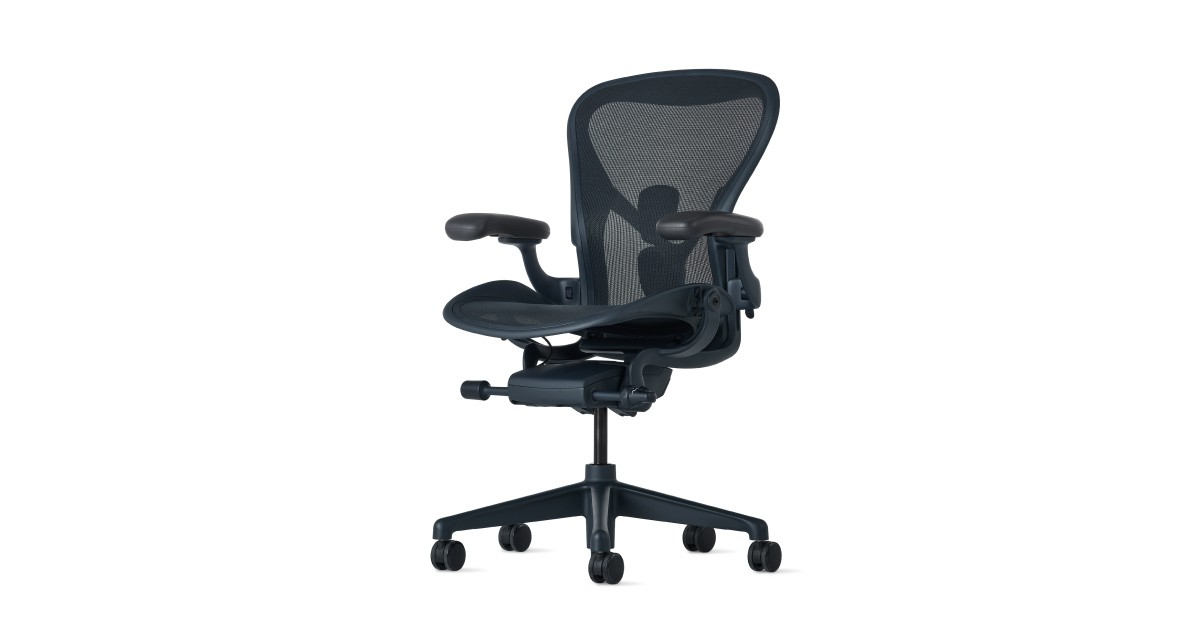
Herman Miller Aeron Chair
An office chair that offers three sizes based on body type, a mesh seat and backrest, and various adjustment options. It focuses on adjusting support positions to fit the body rather than forcing one posture during long hours of remote work.
Don’t choose solely based on brand or price; you should personally test if your feet reach the floor, if the front of the seat doesn’t press against the back of your knees, and if the armrests don’t collide with the desk. When considering a purchase, it's best to first examine 'directly checking the size and adjustment range that fit your body type.'
Don’t choose solely based on brand or price; you should personally test if your feet reach the floor, if the front of the seat doesn’t press against the back of your knees, and if the armrests don’t collide with the desk. When considering a purchase, it's best to first examine 'directly checking the size and adjustment range that fit your body type.'
브랜드 Herman Miller
잘 맞는 상황 체형에 맞는 프레임 크기와 통기성을 중요하게 보는 장시간 좌식 업무
핵심 특징 A·B·C 사이즈와 PostureFit SL 지지 옵션
설치·호환 신장·체중에 맞는 프레임 크기와 팔걸이·틸트 옵션
구매 전 확인 리마스터드 모델과 옵션 구성, 완제품 배송 여부
Steelcase Leap
An office chair designed to follow users' movements, allowing adjustment for seat depth, lumbar support, and armrests. It's suitable for environments where posture frequently changes between keyboard work and screen viewing.
Don’t crank the lumbar support up too high from the start; adjust it based on your body's responses from a low setting, and also make a habit of getting up and moving every hour. A critical check before connecting to actual work is 'confirming local options and warranty conditions.'
Don’t crank the lumbar support up too high from the start; adjust it based on your body's responses from a low setting, and also make a habit of getting up and moving every hour. A critical check before connecting to actual work is 'confirming local options and warranty conditions.'
브랜드·제공사 Steelcase
제품·서비스 분류 조절형 업무 의자
추천 용도 자세 변화가 잦은 책상 업무
핵심 기능 등판 유연성·좌판 깊이·팔걸이 조절
도입 전 확인 지역별 옵션과 보증 조건을 확인
Humanscale Freedom Headrest
An office chair with a reclining structure and headrest that responds to the user's weight and movement. It's aimed at users who want to transition naturally between focused and relaxed postures without frequently adjusting the levers.
When leaning back, make sure the screen height is adjusted so that you don’t have to look up at the monitor, and ensure that there’s no forced angle on your wrists between the armrests and the desk. When comparing the official instructions and the using environment, prioritize checking the 'headrest height and seat depth by testing.'
When leaning back, make sure the screen height is adjusted so that you don’t have to look up at the monitor, and ensure that there’s no forced angle on your wrists between the armrests and the desk. When comparing the official instructions and the using environment, prioritize checking the 'headrest height and seat depth by testing.'
브랜드·제공사 Humanscale
제품·서비스 분류 자동 리클라인 업무 의자
추천 용도 복잡한 레버 없이 기대는 자세를 바꾸는 사람
핵심 기능 체중 반응형 리클라인·헤드레스트
도입 전 확인 헤드레스트 높이와 좌판 깊이를 직접 시험
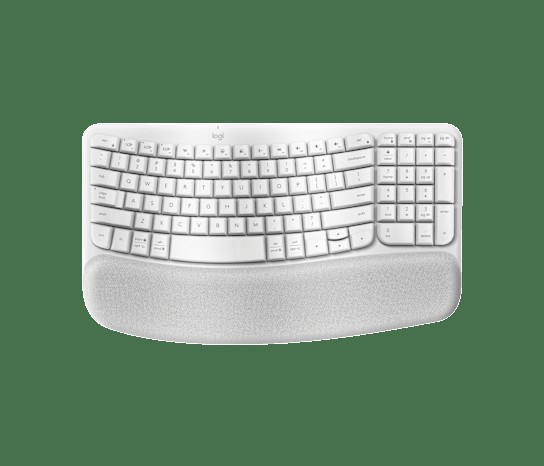
Logitech Wave Keys
A wireless keyboard featuring a wave-shaped key arrangement that gently rises in the center and an integrated cushioned palm rest. It's a choice that reduces the adaptation burden compared to a fully separated keyboard while changing hand and forearm postures.
Don’t type while pressing your wrists against the palm rest; lightly support the underside of your palms and check that the front legs of the keyboard don't push your wrists upward. Before deciding on a purchase or subscription, first check if 'language layout and operating system key labels are compatible.'
Don’t type while pressing your wrists against the palm rest; lightly support the underside of your palms and check that the front legs of the keyboard don't push your wrists upward. Before deciding on a purchase or subscription, first check if 'language layout and operating system key labels are compatible.'
브랜드 Logitech
잘 맞는 상황 익숙한 일체형 배열을 유지하면서 손 위치를 완만하게 바꾸고 싶은 경우
핵심 특징 곡선형 키 배열과 3대 기기 전환
연결·호환 Bluetooth 또는 Logi Bolt, Windows·macOS 등 지원 범위 확인
구매 전 확인 판매 지역의 키 배열과 Logi Bolt 수신기 포함 여부
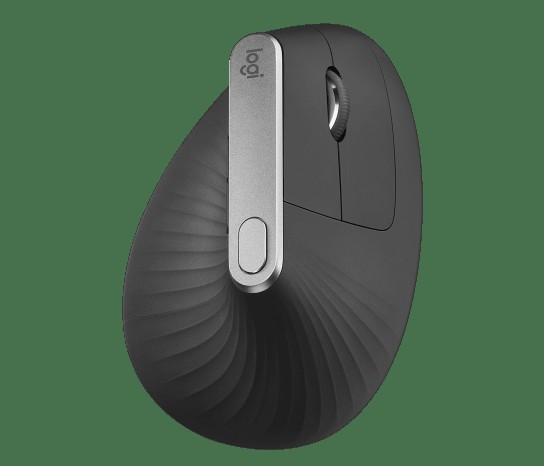
Logitech MX Vertical
A vertical mouse designed with a 57-degree angle that turns the palm sideways and includes rechargeable wireless connectivity. It offers an alternative grip posture for users who experience a significant inward twist in their wrists with regular mice.
Move the mouse with your entire arm instead of just the wrist, and adjust the depth and sensitivity so that it doesn’t press against your forearm at the desk's edge. During the trial use stage, it’s important not to skip testing 'hand size, button placement, and pointer speed.'
Move the mouse with your entire arm instead of just the wrist, and adjust the depth and sensitivity so that it doesn’t press against your forearm at the desk's edge. During the trial use stage, it’s important not to skip testing 'hand size, button placement, and pointer speed.'
브랜드 Logitech
잘 맞는 상황 높은 본체를 안정적으로 감쌀 수 있는 중간·큰 손
핵심 특징 57도 그립과 USB-C 충전
연결·호환 Bluetooth·수신기·USB-C 유선 연결 지원 여부 확인
구매 전 확인 본체 높이와 휴대성, 손 크기 적합성
Ergotron LX Desk Monitor Arm
A desk-mounted arm that secures a monitor and allows for height, distance, and angle adjustments. It helps center the screen at eye level while utilizing a laptop stand and external display, freeing up desk space.
Don’t only look at the product's weight capacity and VESA compatibility; check the tabletop's thickness and material where the clamp will be fixed, and ensure to leave some slack in the cables to prevent tension on connectors when moving. Before introducing it into your workspace, it’s necessary to verify if 'monitor weight, VESA compatibility, and tabletop strength match' conditions.
Don’t only look at the product's weight capacity and VESA compatibility; check the tabletop's thickness and material where the clamp will be fixed, and ensure to leave some slack in the cables to prevent tension on connectors when moving. Before introducing it into your workspace, it’s necessary to verify if 'monitor weight, VESA compatibility, and tabletop strength match' conditions.
브랜드·제공사 Ergotron
제품·서비스 분류 모니터 암
추천 용도 화면 높이와 거리를 자주 바꾸는 책상
핵심 기능 높이·회전·틸트 조절
도입 전 확인 모니터 무게·VESA 규격과 책상 상판 강도 확인
Kensington SmartFit SoleMate Pro
An ergonomic footrest that supports the feet under the desk and allows for height and angle adjustments. It addresses situations where feet lift due to setting the chair height to match the keyboard and elbows, causing pressure on the thighs.
Ensure that the entire foot is securely in contact without excessively raising the knees, and periodically change your posture to avoid developing a habit of leaning to one side. The first thing to check in the selection process is 'confirming pressure behind the knees and the space under the desk.'
Ensure that the entire foot is securely in contact without excessively raising the knees, and periodically change your posture to avoid developing a habit of leaning to one side. The first thing to check in the selection process is 'confirming pressure behind the knees and the space under the desk.'
브랜드·제공사 Kensington
제품·서비스 분류 각도 조절 발받침
추천 용도 의자를 낮춰도 발이 바닥에 닿지 않는 사람
핵심 기능 높이·각도 조절과 미끄럼 방지 표면
도입 전 확인 무릎 뒤 압박과 책상 아래 공간을 확인
Fellowes Hana Wrist Support
A desk accessory that can be adjusted to support the bottom of the palms in front of the keyboard. It can help arrange the environment where wrists twist upwards due to differences in desk corner and keyboard heights.
Avoid typing while constantly pressing your wrist into the support; lightly support it during breaks between inputs, and if pain or numbness persists, prioritize consulting a professional over adjusting the product. As a final comparison criterion, you can use the 'not pressing down on the wrists while typing' item.
Avoid typing while constantly pressing your wrist into the support; lightly support it during breaks between inputs, and if pain or numbness persists, prioritize consulting a professional over adjusting the product. As a final comparison criterion, you can use the 'not pressing down on the wrists while typing' item.
브랜드·제공사 Fellowes
제품·서비스 분류 손목 받침
추천 용도 키보드 앞 손바닥 지지
핵심 기능 높이 조절과 쿠션 지지
도입 전 확인 입력 중 손목을 고정해 누르지 않기
It's better to sit and compare chairs like the Aeron, Leap, and Freedom, which have different adjustment mechanisms and sizes. You can change your hand and forearm posture with the Wave Keys and MX Vertical, and the Ergotron LX expands screen positioning options. If your feet aren't flat on the ground due to the chair being set to desk height, a footrest like the SoleMate Pro may be needed, and the Hana wrist support serves as a tool to create rest points rather than press on the joint while you input.
Don't change all equipment at once. Record the tasks and times that cause pain, and adjust the biggest culprit first. The top of the screen should generally be around eye level, elbows should be close to the body, and feet should be securely supported, without maintaining the same posture for too long. Developing the habit of getting up to walk or shifting your gaze to a distant object every 30-60 minutes is more important than any accessory. Check the return and warranty conditions of new equipment, and it's safer to adapt to it gradually, starting with lower intensity over several days.
Don't change all equipment at once. Record the tasks and times that cause pain, and adjust the biggest culprit first. The top of the screen should generally be around eye level, elbows should be close to the body, and feet should be securely supported, without maintaining the same posture for too long. Developing the habit of getting up to walk or shifting your gaze to a distant object every 30-60 minutes is more important than any accessory. Check the return and warranty conditions of new equipment, and it's safer to adapt to it gradually, starting with lower intensity over several days.
At a glance
8 items
Herman Miller Aeron Chair
Herman Miller
Steelcase Leap
Steelcase조절형 업무 의자자세 변화가 잦은 책상 업무
Humanscale Freedom Headrest
Humanscale자동 리클라인 업무 의자
Logitech Wave Keys
Logitech
Logitech MX Vertical
Logitech57도 그립과 USB-C 충전
Ergotron LX Desk Monitor Arm
Ergotron모니터 암높이·회전·틸트 조절
Kensington SmartFit SoleMate Pro
Kensington각도 조절 발받침
Fellowes Hana Wrist Support
Fellowes손목 받침키보드 앞 손바닥 지지
As part of the Coupang Partners program, this post may earn a commission from qualifying purchases.
Comments 0
Log in to leave a comment.
Be the first to comment.
How about these lists?


You might also like


🎲
Not ready to stop here?
Wondering what to read next is the biggest waste of time.
Let the dice decide — you won't know what pops up until you roll.
If you don't press it… won't you wonder forever? 👀
