Collection
Remote Work
2026.09.20
Portable Workspace You Can Create Anywhere with Just One Laptop
Real products organized with a portable screen, stand, keyboard, and charger
A portable workspace isn't just throwing your home desk into a bag. While bringing an extra screen can boost productivity, it also adds weight along with chargers and cables, making it hard to find room in cramped accommodations. It’s more practical to first decide on the essential tasks you need to accomplish during your travel, such as document review, meetings, or focused writing, rather than expecting the same posture and pace everywhere.
This list explores a set of three actual portable monitors, two types of laptop stands, two kinds of keyboards, and one multi-port charger, all organized in a single bag. Each product includes details on screen ratio, video output compatibility, key layout, power distribution, and protection methods during transit. Instead of packing everything, divide your gear into sets for a day trip and a long-term workation to reduce weight and points of failure.
This list explores a set of three actual portable monitors, two types of laptop stands, two kinds of keyboards, and one multi-port charger, all organized in a single bag. Each product includes details on screen ratio, video output compatibility, key layout, power distribution, and protection methods during transit. Instead of packing everything, divide your gear into sets for a day trip and a long-term workation to reduce weight and points of failure.
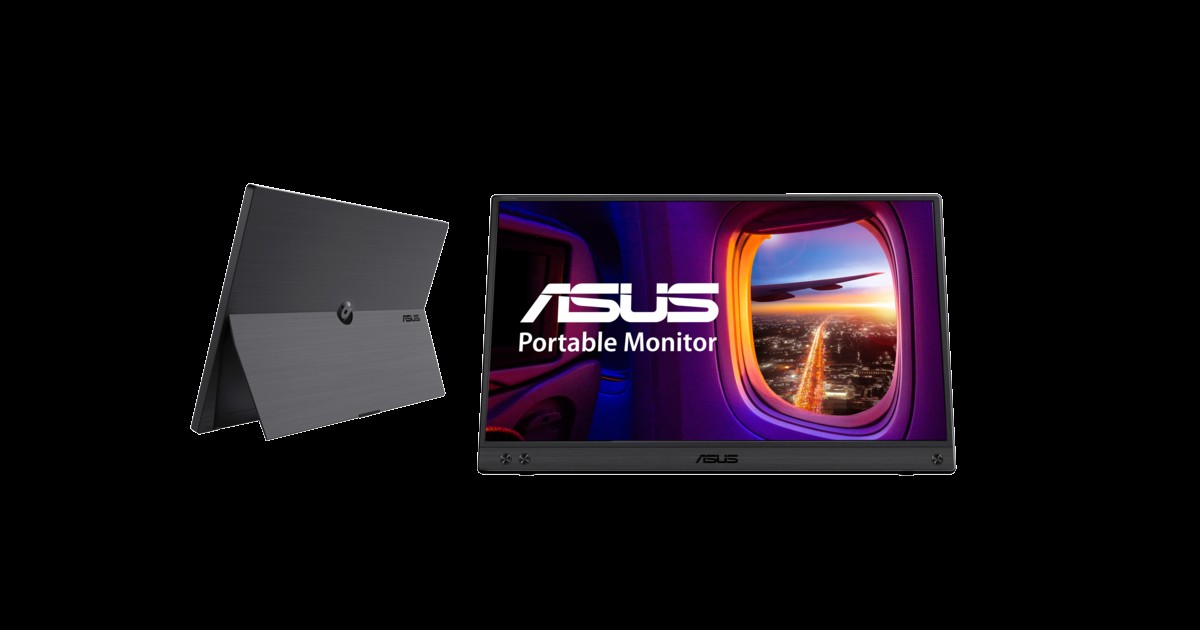
ASUS ZenScreen MB16ACV
A 15.6-inch Full HD portable monitor that features USB-C connectivity and a built-in stand. It allows you to create a temporary dual screen setup for sharing documents and reference materials wherever you are, whether in accommodations or shared seating.
Make sure your laptop port supports video output and store the screen panel in a separate sleeve during transit to prevent pressure. It's best to begin your assessment by checking whether your laptop supports 'USB-C video output'.
Make sure your laptop port supports video output and store the screen panel in a separate sleeve during transit to prevent pressure. It's best to begin your assessment by checking whether your laptop supports 'USB-C video output'.
브랜드 ASUS
잘 맞는 상황 문서와 메신저를 세로 또는 가로 보조 화면으로 쓰는 이동 업무
핵심 특징 USB-C 하이브리드 신호와 자동 회전 지원 범위
연결·호환 노트북 USB-C의 영상 출력 또는 USB-A 드라이버 조건 확인
구매 전 확인 밝기·스탠드 각도와 연결 케이블 구성
Lenovo ThinkVision M14
A portable monitor that combines a 14-inch Full HD panel with a foldable stand. You can easily adjust the left and right placements using both USB-C ports, making it suitable for small travel desks.
Avoid raising the screen brightness too high and try to keep the distance between your laptop and eyes similar to reduce eye strain from excessive movement. A key check to do before connecting for actual work is to verify 'USB-C DisplayPort Alt Mode support'.
Avoid raising the screen brightness too high and try to keep the distance between your laptop and eyes similar to reduce eye strain from excessive movement. A key check to do before connecting for actual work is to verify 'USB-C DisplayPort Alt Mode support'.
브랜드·제공사 Lenovo
제품·서비스 분류 14형 휴대용 모니터
추천 용도 가벼운 이동식 듀얼 화면
핵심 기능 Full HD·USB-C 양방향 포트·틸트 스탠드
도입 전 확인 USB-C DisplayPort Alt Mode 지원
LG gram +view 16MR70
A portable monitor with a 16:10 aspect ratio and high-resolution panel that displays vertical information from documents and code widely. You can switch between landscape and portrait modes to separate long document reviews and reference screens.
High-resolution screens may impact your laptop's performance and battery usage, so it's wise to test scaling, brightness, and power connection methods in advance. When comparing official guidelines and usage environments, be sure to cross-check 'model names by region and power supply conditions' first.
High-resolution screens may impact your laptop's performance and battery usage, so it's wise to test scaling, brightness, and power connection methods in advance. When comparing official guidelines and usage environments, be sure to cross-check 'model names by region and power supply conditions' first.
브랜드·제공사 LG
제품·서비스 분류 16형 휴대용 모니터
추천 용도 넓은 세로 작업 공간이 필요한 이동 업무
핵심 기능 16:10 WQXGA·USB-C·오토 피벗
도입 전 확인 지역별 모델명과 전력 공급 조건
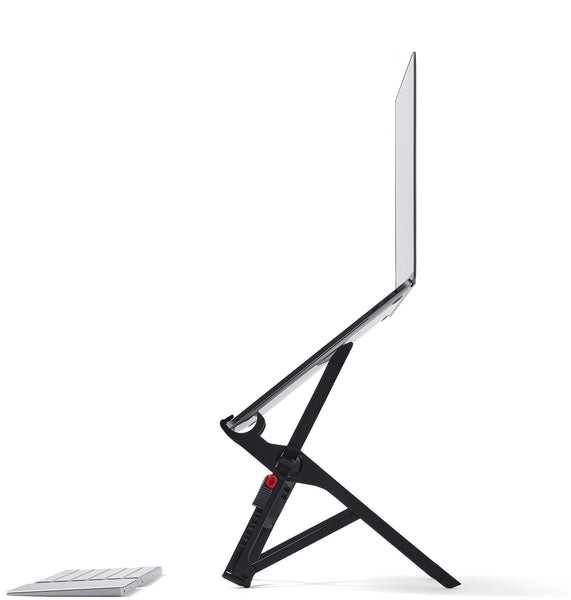
Roost V3 Laptop Stand
A height-adjustable stand designed to raise your laptop screen above the desk while folding for portability. It allows you to keep your screen at eye level when using an external keyboard and mouse in your workspace.
Using the laptop's built-in keyboard while elevated may strain your shoulders, so it's better to use a separate input device. Before making a purchase or subscription decision, you should check the necessity of 'laptop thickness and external keyboard'.
Using the laptop's built-in keyboard while elevated may strain your shoulders, so it's better to use a separate input device. Before making a purchase or subscription decision, you should check the necessity of 'laptop thickness and external keyboard'.
브랜드 Roost
잘 맞는 상황 출장 가방에 넣을 만큼 가볍고 높은 거치가 필요한 사용자
핵심 특징 접이식 구조와 다단 높이 조절
설치·호환 노트북 전면 두께와 화면 힌지 형태
구매 전 확인 외부 키보드 필수 여부와 좁은 받침 접촉면
MOFT Z 5-in-1 Sit-Stand Desk
A foldable laptop stand with an origami structure that creates multiple heights and angles. Even in accommodations without a separate lifting desk, you can quickly stand to view the screen or change the angle of your tablet.
Don’t schedule long periods of standing work from the start; find a stable flat surface and check if typing pressure causes any wobbling with your actual device. During the trial usage phase, it’s important not to miss out on 'device weight and work surface depth'.
Don’t schedule long periods of standing work from the start; find a stable flat surface and check if typing pressure causes any wobbling with your actual device. During the trial usage phase, it’s important not to miss out on 'device weight and work surface depth'.
브랜드·제공사 MOFT
제품·서비스 분류 접이식 노트북 스탠드
추천 용도 앉기·서기 높이를 바꾸는 임시 책상
핵심 기능 여러 각도·평면 접이·무전원 구조
도입 전 확인 기기 무게와 작업대 깊이
Logitech Keys-To-Go 2
A portable keyboard with a thin protective cover and Bluetooth connectivity. After placing your laptop on the stand, it’s compact enough to use as a separate input device or to turn your tablet into a simple work terminal.
Test if the key spacing and short travel distance are suitable for long document work, and check if you can find a familiar language layout locally. Before incorporating it into your work environment, it’s necessary to verify that the 'language layout and battery replacement method' conditions are met.
Test if the key spacing and short travel distance are suitable for long document work, and check if you can find a familiar language layout locally. Before incorporating it into your work environment, it’s necessary to verify that the 'language layout and battery replacement method' conditions are met.
브랜드·제공사 Logitech
제품·서비스 분류 초슬림 휴대 키보드
추천 용도 태블릿·노트북의 가벼운 외장 입력
핵심 기능 보호 커버·Bluetooth·멀티기기
도입 전 확인 언어 배열과 배터리 교체 방식
Satechi Slim X1 Bluetooth Backlit Keyboard
A rechargeable keyboard offering a compact layout, Bluetooth multi-device switching, and backlighting. It’s great for continuing document work while your laptop is elevated in dimly lit accommodations.
In small layouts, some function key positions may change, so check frequently used shortcuts and the keyboard language toggle actions beforehand. The first thing to confirm during the selection process should be the 'operating system key layout and charging cable'.
In small layouts, some function key positions may change, so check frequently used shortcuts and the keyboard language toggle actions beforehand. The first thing to confirm during the selection process should be the 'operating system key layout and charging cable'.
브랜드·제공사 Satechi
제품·서비스 분류 소형 무선 키보드
추천 용도 작은 파우치에 넣는 백라이트 키보드
핵심 기능 Bluetooth 멀티기기·USB-C 충전·백라이트
도입 전 확인 운영체제 키 배열과 충전 케이블
Anker Prime 100W GaN Wall Charger
A GaN wall charger that can charge laptops and mobile devices from multiple USB-C and USB ports. It reduces the size and outlet occupancy of your mobile workstation set by consolidating different adapters into one.
When using all ports simultaneously, the output of a single port may decrease, so it’s essential to check both the charging demands of your laptop and the cable ratings. As a final comparison criterion, you can use the 'output distribution and plug specifications when using multiple ports' item.
When using all ports simultaneously, the output of a single port may decrease, so it’s essential to check both the charging demands of your laptop and the cable ratings. As a final comparison criterion, you can use the 'output distribution and plug specifications when using multiple ports' item.
브랜드·제공사 Anker
제품·서비스 분류 멀티포트 고출력 충전기
추천 용도 노트북·휴대전화·액세서리 동시 충전
핵심 기능 GaN·USB-C 다중 출력·100W급 충전
도입 전 확인 포트 동시 사용 시 출력 배분과 플러그 규격
You can choose from the lightweight ThinkVision M14, the standard-sized ZenScreen, or the wide 16:10 workspace gram +view that fits your work and bag. To elevate your screen, you'll need either the Roost V3 or MOFT Z along with an external keyboard, both the Keys-To-Go 2 and Slim X1 provide different balances of portability and typing feel. When selecting a multi-charger, confirm the actual output distributed to your laptop is more important than just the number of ports.
Before you leave, spread out all your gear on a small table outside your home and time how long it takes to set up and dismantle. Label cables and adapters with their functions, and keep the screen in a sleeve that prevents pressure. On travel days, schedule tasks that can be done with just the laptop, with more focused work being done after reaching your accommodation for safety. Be sure to check the work hours, communication quality, and security policies of your workation location before booking.
Before you leave, spread out all your gear on a small table outside your home and time how long it takes to set up and dismantle. Label cables and adapters with their functions, and keep the screen in a sleeve that prevents pressure. On travel days, schedule tasks that can be done with just the laptop, with more focused work being done after reaching your accommodation for safety. Be sure to check the work hours, communication quality, and security policies of your workation location before booking.
At a glance
8 items
ASUS ZenScreen MB16ACV
ASUS
Lenovo ThinkVision M14
Lenovo14형 휴대용 모니터가벼운 이동식 듀얼 화면
LG gram +view 16MR70
LG16형 휴대용 모니터
Roost V3 Laptop Stand
Roost접이식 구조와 다단 높이 조절
MOFT Z 5-in-1 Sit-Stand Desk
MOFT접이식 노트북 스탠드기기 무게와 작업대 깊이
Logitech Keys-To-Go 2
Logitech초슬림 휴대 키보드언어 배열과 배터리 교체 방식
Satechi Slim X1 Bluetooth Backlit Keyboard
Satechi소형 무선 키보드
Anker Prime 100W GaN Wall Charger
Anker멀티포트 고출력 충전기
As part of the Coupang Partners program, this post may earn a commission from qualifying purchases.
Comments 0
Log in to leave a comment.
Be the first to comment.
How about these lists?


You might also like


🎲
Not ready to stop here?
Wondering what to read next is the biggest waste of time.
Let the dice decide — you won't know what pops up until you roll.
If you don't press it… won't you wonder forever? 👀