The Productive Worker's Desk: Desk Setup IT Gear Collection
10 real products that make the biggest difference on your first work desk
You don't need to buy all ten. Just pick the one situation that bothers you most often right now and start with the product that solves it. If your monitor base takes up too much room, look at a monitor arm or shelf first; if your eyes get tired at night, a monitor light; if your laptop is short on ports, a dock. Adding one step at a time while checking each product's compatibility specs and your desk's dimensions cuts down on impulse buys and rearranging.

Ergotron LX Desk Monitor Arm
Ergotron LX: free up the space under your monitor stand
Before buying, check your monitor's VESA mounting holes and its actual weight without the stand. Also measure the thickness of the desktop where the clamp grips, the frame underneath, and the distance to the wall behind. If the screen slowly sags after installation, readjust the joint tension, and to be safe, leave enough slack in the power and video cables that they don't pull even when the arm is fully extended.

IKEA ELLOVEN Monitor Stand + Drawer
IKEA ELLOVEN: adds a drawer, too
Because its height is fixed, first compare your current monitor stand height with your eye level. Also check whether your monitor's base sits stably within the stand's width and whether the drawer catches on your keyboard or wrist rest when you open it. Just because you have storage now doesn't mean you should fill it with things you rarely use, since that only makes things harder to find; it's better to keep only the cables and note tools you use every day.

BenQ ScreenBar Halo 2
BenQ ScreenBar Halo 2: a single line of light above your screen
It doesn't attach the same way to the top of every monitor. Check your screen's thickness, the curve of its back, and where the top webcam sits, and make sure the light bar doesn't block the camera or vents. Adjust the angle so the light doesn't reflect off the screen, then turn it on only as much as you need for the surrounding light. Decide where to plug in the USB power and which way the cable will show before installing.

Logitech MX Mechanical Mini
Logitech MX Mechanical Mini: switch between work devices fast
When buying, double-check the Korean layout, the switch type, and whether a Logi Bolt receiver is included. Linear, tactile, and clicky switches differ in sound and feel, so noise becomes an important factor in shared spaces. If you enter a lot of numbers, think about whether you'll need a separate keypad. If the front of the keyboard feels higher than your wrists, pairing it with a thin palm rest is a good idea.
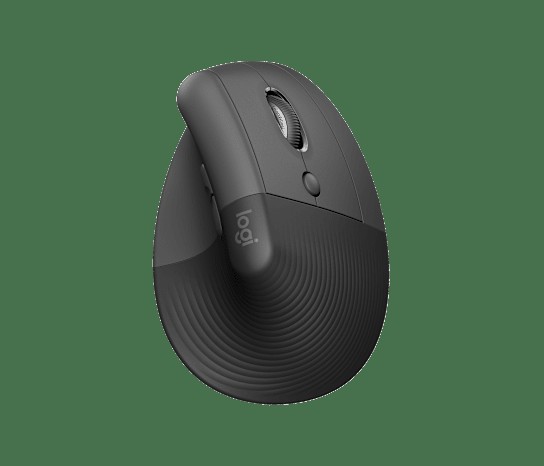
Logitech Lift Vertical Ergonomic Mouse
Logitech Lift: change the angle of your wrist
A vertical mouse doesn't fix every kind of pain, so first check your hand size and whether you need the left- or right-handed model. Cursor movement and click positions may feel unfamiliar at first, so it helps to lower the sensitivity and adjust over a few days. Also consider whether you'll connect via Bluetooth or Logi Bolt and where you'll keep the receiver. Placing it close to your keyboard so your elbow doesn't flare out is just as important as choosing the product.

CalDigit TS4 Thunderbolt Station 4
CalDigit TS4: everything on a single cable
If you choose by port count alone, you might not get the display setup you want. Check your laptop's Thunderbolt support, the number of external monitors supported per operating system, and whether 98W charging is enough for your device against the official compatibility information. Not all USB ports have the same speed and power output, so connect external SSDs and charging devices to the right ports. It's best not to block ventilation and to place it within reach of the included cable.

Belkin BoostCharge Pro 3-in-1 Wireless Charging Stand with Qi2 15W
Belkin 3-in-1: a set spot for three devices
Since it includes an Apple Watch module, first check that your watch and earbuds are compatible. Qi2 15W charging requires a supported phone and a case that keeps magnetic alignment, and card holders or metal rings can cause heat and interrupt charging. Measure the space the base takes up and the direction of the power cable at the back, and check the package contents to see whether an adapter is included.

IKEA SIGNUM Cable Management Rack
IKEA SIGNUM: lift cables off the floor
Check the material and thickness of your desktop and where the metal frame sits underneath before installing the screws; it may not be suitable for glass or hollow-core desktops. Don't pile heavy adapters on one side, and leave room for heat to escape. If you have a height-adjustable desk, raise it to its maximum height and test that the wall outlet and monitor cables don't pull.

Orbitkey Desk Mat
Orbitkey Desk Mat: holds papers and charging cables, too
If you choose the Large size, first measure your desk's width and depth and where your monitor stand's feet will sit. Also check which way the document pocket opens and whether the cable holder gets in the way of your hand movements. Check how to clean it if you spill a drink, and to be safe, let it dry completely before putting electronics back on it. Wipe dust off the underside regularly to reduce marks on the desktop and slipping.

Twelve South Curve
Twelve South Curve: lift your laptop screen
Since the screen is raised, it's hard to keep using the built-in keyboard, so set aside space for an external keyboard and mouse as well. For laptops from other brands, check that the base width, front lip, and hinge angle fit, and make sure the air intakes aren't blocked by the support points. Because the height is fixed, calculate the screen position in advance with your chair and desk height already adjusted to avoid buying twice.
Once you've chosen your products, don't install everything at once; adjust screen height, keyboard and mouse position, and cable length in that order. After about a week of real use, you'll be able to tell which items you move often and which can stay fixed. Rather than copying a finished desk from a photo, choosing what to keep based on your own hand movements and device combination makes for a desk setup that lasts much longer.
As part of the Coupang Partners program, this post may earn a commission from qualifying purchases.
Comments 0
Log in to leave a comment.
Be the first to comment.
How about these lists?


You might also like


Not ready to stop here?
Wondering what to read next is the biggest waste of time.
Let the dice decide — you won't know what pops up until you roll.
If you don't press it… won't you wonder forever? 👀