
Collection
Audio
2026.10.01
Compact Mixer for Instant Control of Mic and Instruments
Comparing Mic Input, Effects, USB, and Routing of Real Analog and Hybrid Mixers
Compact mixers allow for immediate adjustments of gain, tone, and volume for microphones and instruments with knobs and faders, making them useful for practice rooms, small performances, and broadcasting. However, having a USB port doesn't mean you can send all channels to a computer individually. We differentiate whether it's sending only a stereo mix or supporting multi-track recordings based on actual products.
First, count the number of required XLR mics, stereo line inputs, AUX monitor mixes, and built-in effects. If you need to adjust the main speakers, headphones, and recording outputs differently, the bus structure becomes important. Even with a compressor, it's challenging to avoid noise and distortion if the input gain is set incorrectly.
First, count the number of required XLR mics, stereo line inputs, AUX monitor mixes, and built-in effects. If you need to adjust the main speakers, headphones, and recording outputs differently, the bus structure becomes important. Even with a compressor, it's challenging to avoid noise and distortion if the input gain is set incorrectly.
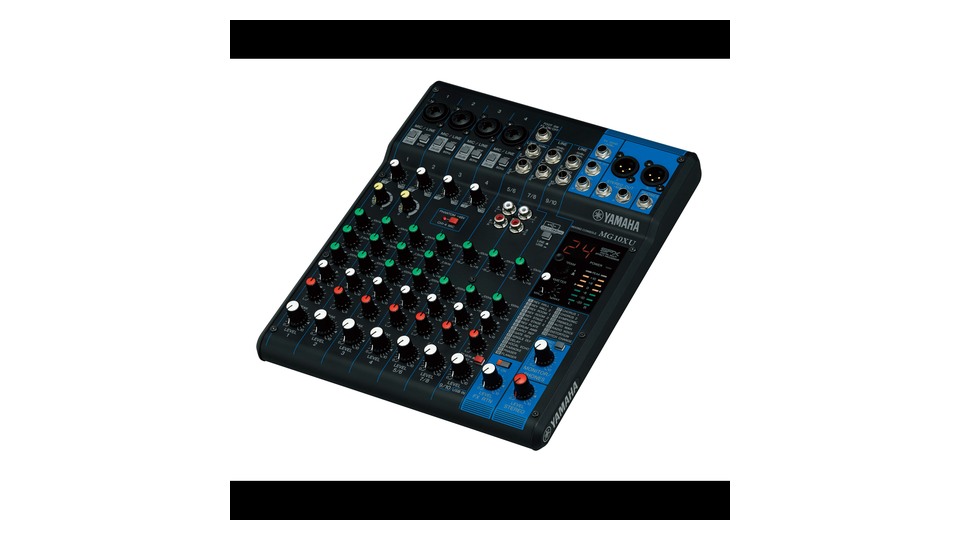
Yamaha MG10XU
When choosing the Yamaha MG10XU, it’s essential to first apply the actual connection environment and usage purpose rather than just the product name. It offers 4 mic/line combo inputs and a total of 10 channels, 1-knob compressor, and SPX digital effects. It comes with 24bit/192kHz 2-input/2-output USB audio and XLR main output. This configuration is advantageous in situations where 'using mics and effects together for small performances, practice, and streaming', but it can be utilized effectively when your available devices and space match these conditions.
The USB does not support multi-track separation for each channel but is stereo mix-focused instead. The phantom power applies to the mic inputs in common, so check the phantom compatibility of the connected equipment. Especially check the '4 XLRs, 1-knob comp, SPX FX, 2in/2out USB' items before finalizing sales configuration and installation location. In USB broadcasting, make sure to test the loop first while the computer playback sound is on to avoid mixing ST and USB returns.
The USB does not support multi-track separation for each channel but is stereo mix-focused instead. The phantom power applies to the mic inputs in common, so check the phantom compatibility of the connected equipment. Especially check the '4 XLRs, 1-knob comp, SPX FX, 2in/2out USB' items before finalizing sales configuration and installation location. In USB broadcasting, make sure to test the loop first while the computer playback sound is on to avoid mixing ST and USB returns.
브랜드 Yamaha
모델 MG10XU
제품 유형 10채널 USB SPX 아날로그 믹서
추천 용도 작은 공연·연습·스트리밍에 마이크와 이펙트를 함께 쓰기
구매 확인 XLR 4개·1노브 컴프·SPX FX·2in/2out USB
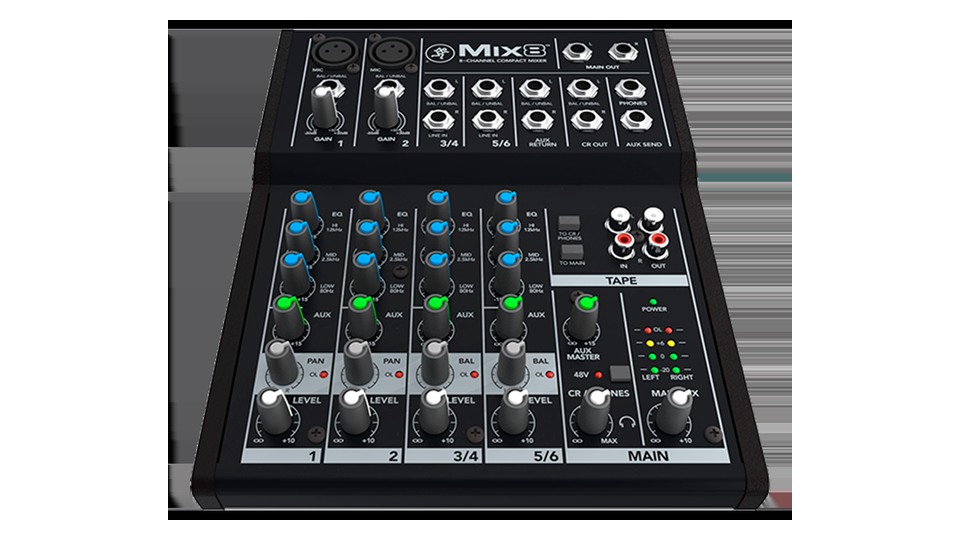
Mackie Mix8
When choosing the Mackie Mix8, it’s essential to first apply the actual connection environment and usage purpose rather than just the product name. It is an 8-channel analog mixer that provides 2 Onyx mic preamps, stereo line inputs, AUX send/return, and RCA tape in/out options. It features main, control room, and headphone outputs. This configuration is advantageous in situations where 'combining mics, instruments, and audio sources easily without a computer', but it can be effectively utilized when your available devices and space match these conditions.
Since there is no USB audio and built-in effects, a separate interface is needed for computer recordings. With only 2 mic inputs, first count the number of conversation participants and required AUX monitors. Especially check the '2 XLRs, AUX send, RCA tape in/out, and no USB' items before finalizing sales configuration and installation location. By separating the main and control room outputs for wiring to the recorder and speakers, you can maintain a consistent recording level even when changing monitor volume.
Since there is no USB audio and built-in effects, a separate interface is needed for computer recordings. With only 2 mic inputs, first count the number of conversation participants and required AUX monitors. Especially check the '2 XLRs, AUX send, RCA tape in/out, and no USB' items before finalizing sales configuration and installation location. By separating the main and control room outputs for wiring to the recorder and speakers, you can maintain a consistent recording level even when changing monitor volume.
브랜드 Mackie
모델 Mix8
제품 유형 8채널 콤팩트 아날로그 믹서
추천 용도 컴퓨터 없이 마이크·악기·음원을 간단히 합치기
구매 확인 XLR 2개·AUX 송·RCA 테이프 입출력과 USB 없음
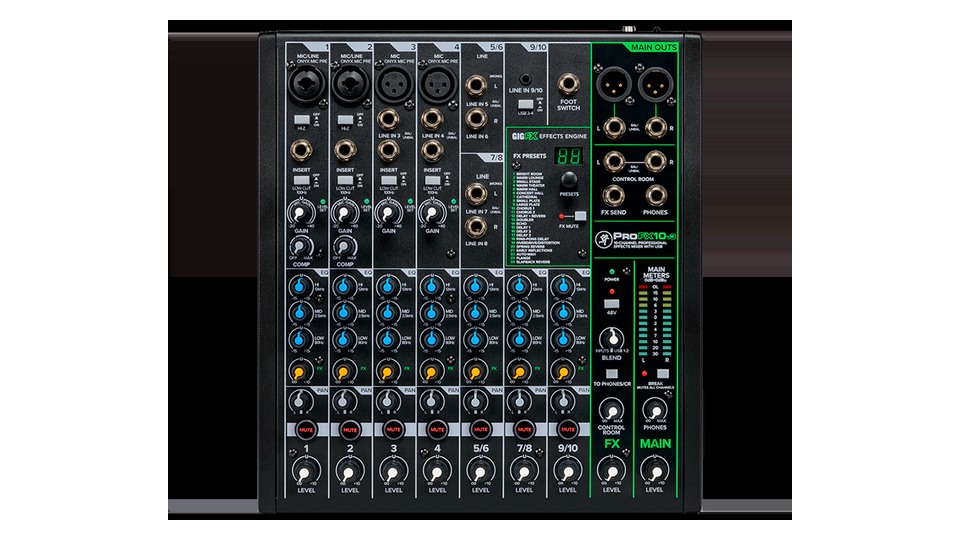
Mackie ProFX10v3
When choosing the Mackie ProFX10v3, it’s essential to first apply the actual connection environment and usage purpose rather than just the product name. It offers 4 Onyx mic preamps and 10 channel inputs, along with a GigFX effects engine. It features USB recording up to 24bit/192kHz, 48V phantom power, and independent headphone output. This configuration is advantageous for situations involving 'band practice and streaming while using mics, effects, and USB simultaneously', but it can be effectively utilized when your available devices and space match these conditions.
If the routing for USB returns and the main mix is incorrectly set, a loop could occur where computer sound is re-inputted. Check the connected equipment before turning on phantom power, lowering the main volume first. Especially verify the '4 Onyx preamps, GigFX, 24bit/192kHz USB' items before finalizing sales configuration and installation location. Instead of applying effects equally to both the presenter’s voice and instruments, start with a low FX return to confirm through headphones and main speakers individually.
If the routing for USB returns and the main mix is incorrectly set, a loop could occur where computer sound is re-inputted. Check the connected equipment before turning on phantom power, lowering the main volume first. Especially verify the '4 Onyx preamps, GigFX, 24bit/192kHz USB' items before finalizing sales configuration and installation location. Instead of applying effects equally to both the presenter’s voice and instruments, start with a low FX return to confirm through headphones and main speakers individually.
브랜드 Mackie
모델 ProFX10v3
제품 유형 USB·GigFX 10채널 아날로그 믹서
추천 용도 밴드 연습과 스트리밍에 마이크·이펙트·USB를 함께 쓰기
구매 확인 Onyx 프리앰프 4개·GigFX·24bit/192kHz USB
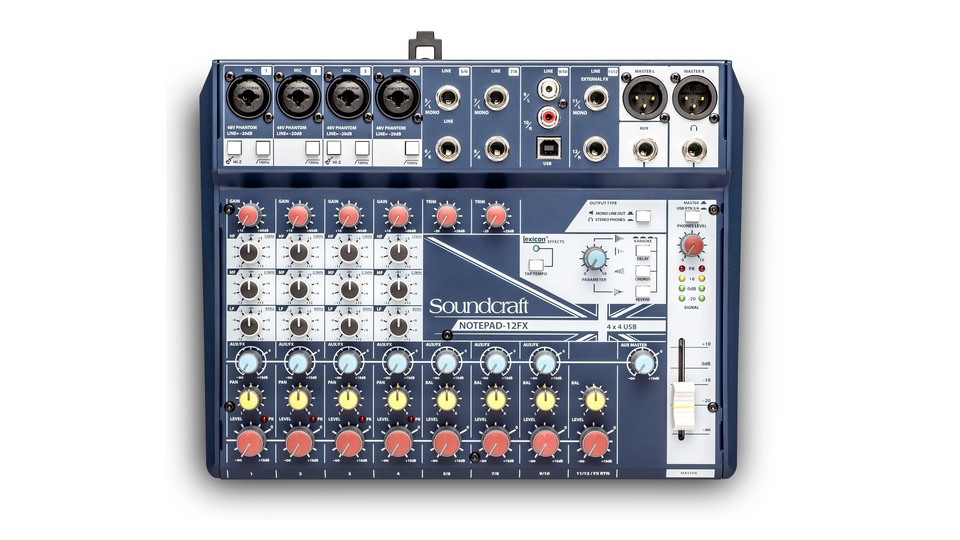
Soundcraft Notepad-12FX
When choosing the Soundcraft Notepad-12FX, it’s essential to first apply the actual connection environment and usage purpose rather than just the product name. It provides 4 Soundcraft mic preamps, Hi-Z inputs, and features Lexicon reverb, chorus, and delay. It includes 3-input/4-output USB audio, XLR main output, and AUX outputs. This configuration is advantageous in situations involving 'using Lexicon effects for podcasts, streaming, and small performances', but it can be effectively utilized when your available devices and space match these conditions.
The USB channel configuration may vary depending on driver and switch settings, so it’s important to test in/output in your DAW beforehand. The limited number of AUX outputs may not suit setups requiring multiple independent monitor mixes. Especially check the '4 XLRs, Hi-Z, 3 inputs, 4-output USB, and AUX limitations' items before finalizing sales configuration and installation location. If you want to use all four USB channels, be sure to note the operating system drivers and DAW input numbers to avoid mixing up stereo sources on-site.
The USB channel configuration may vary depending on driver and switch settings, so it’s important to test in/output in your DAW beforehand. The limited number of AUX outputs may not suit setups requiring multiple independent monitor mixes. Especially check the '4 XLRs, Hi-Z, 3 inputs, 4-output USB, and AUX limitations' items before finalizing sales configuration and installation location. If you want to use all four USB channels, be sure to note the operating system drivers and DAW input numbers to avoid mixing up stereo sources on-site.
브랜드 Soundcraft
모델 Notepad-12FX
제품 유형 Lexicon FX USB 아날로그 믹서
추천 용도 팟캐스트·스트리밍·작은 공연에 Lexicon 이펙트를 활용하기
구매 확인 XLR 4개·Hi-Z·3대·4출력 USB와 AUX 제약
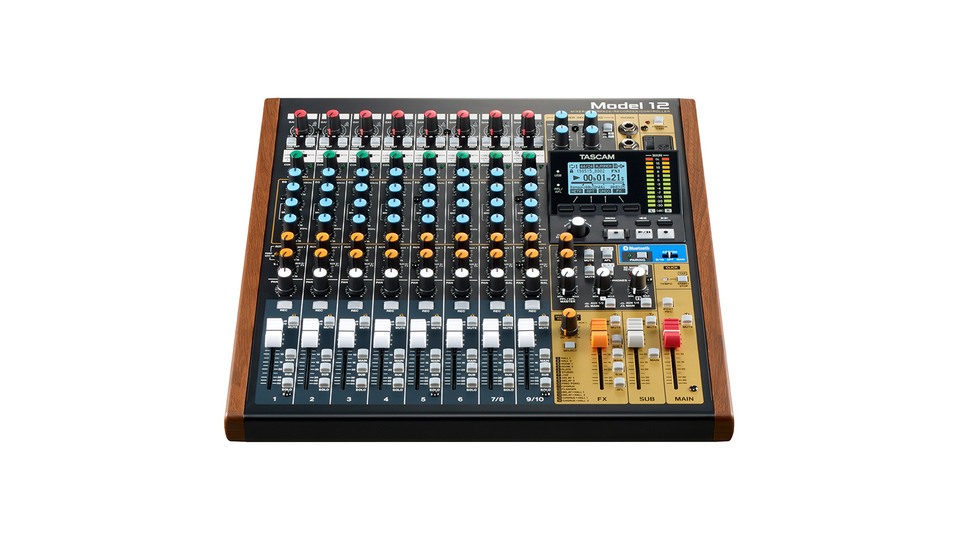
TASCAM Model 12
When choosing the TASCAM Model 12, it’s essential to first apply the actual connection environment and usage purpose rather than just the product name. It combines 10 input tracks, a 12-track SD multi-track recorder, and a 12-input/10-output USB audio interface. It also features DAW control, MIDI in/out, built-in effects, and a compressor. This configuration is advantageous in situations involving 'operating band practice and podcasts concurrently with SD multi-track and DAW', but it can be effectively utilized when your available devices and space match these conditions.
Since it doesn’t have motorized faders, DAW automation positions are not automatically reflected in the physical faders. Check the SD card compatibility list and project sample rate, and distinguish the USB and SD signal flow. Particularly verify the '10 inputs, 12-track SD, 12in/10out USB, MIDI, and no fader automation' items before finalizing sales configuration and installation location. Test running the standalone SD recording and USB DAW recording briefly at the same time to ensure that timelines and backup files appear where expected.
Since it doesn’t have motorized faders, DAW automation positions are not automatically reflected in the physical faders. Check the SD card compatibility list and project sample rate, and distinguish the USB and SD signal flow. Particularly verify the '10 inputs, 12-track SD, 12in/10out USB, MIDI, and no fader automation' items before finalizing sales configuration and installation location. Test running the standalone SD recording and USB DAW recording briefly at the same time to ensure that timelines and backup files appear where expected.
브랜드 TASCAM
모델 Model 12
제품 유형 12트랙 녹음·USB·DAW 제어 하이브리드 믹서
추천 용도 밴드 연습과 팟캐스트를 SD 멀티트랙과 DAW로 동시 운용하기
구매 확인 10입력·12트랙 SD·12in/10out USB·MIDI와 페이더 자동화 없음
The MG10XU features a compressor and SPX effects, Mix8 is a simple analog mixer without USB, ProFX10v3 is equipped with Onyx preamps and GigFX, and Notepad-12FX features Lexicon effects. The Model 12 combines multi-track USB/SD recording with DAW control. Instead of choosing a mixer that's too large for your simple needs, match the necessary buses and recording methods.
When connecting for the first time, lower each channel fader and the main volume, then adjust the gain using PFL and meters first. Turn on 48V phantom power only after connecting all required condenser mics, and turn it off again before unplugging the cables. Don’t connect the main output to the speaker mic input; instead, match line input specifications.
When connecting for the first time, lower each channel fader and the main volume, then adjust the gain using PFL and meters first. Turn on 48V phantom power only after connecting all required condenser mics, and turn it off again before unplugging the cables. Don’t connect the main output to the speaker mic input; instead, match line input specifications.
한눈에 보기
5개
Yamaha MG10XU
Yamaha · MG10XU · 10채널 USB SPX 아날로그 믹서 · 작은 공연·연습·스트리밍에 마이크와 이펙트를 함께 쓰기 · XLR 4개·1노브 컴프·SPX FX·2in/2out USB
Mackie Mix8
Mackie · Mix8 · 8채널 콤팩트 아날로그 믹서 · 컴퓨터 없이 마이크·악기·음원을 간단히 합치기 · XLR 2개·AUX 송·RCA 테이프 입출력과 USB 없음
Mackie ProFX10v3
Mackie · ProFX10v3 · USB·GigFX 10채널 아날로그 믹서 · 밴드 연습과 스트리밍에 마이크·이펙트·USB를 함께 쓰기 · Onyx 프리앰프 4개·GigFX·24bit/192kHz USB
Soundcraft Notepad-12FX
Soundcraft · Notepad-12FX · Lexicon FX USB 아날로그 믹서 · 팟캐스트·스트리밍·작은 공연에 Lexicon 이펙트를 활용하기 · XLR 4개·Hi-Z·3대·4출력 USB와 AUX 제약
TASCAM Model 12
TASCAM · Model 12 · 12트랙 녹음·USB·DAW 제어 하이브리드 믹서 · 밴드 연습과 팟캐스트를 SD 멀티트랙과 DAW로 동시 운용하기 · 10입력·12트랙 SD·12in/10out USB·MIDI와 페이더 자동화 없음
이 포스팅은 쿠팡 파트너스 활동의 일환으로, 이에 따른 일정액의 수수료를 제공받습니다.
댓글 0
로그인 후 댓글을 작성할 수 있습니다.
첫 댓글을 남겨보세요.
이런 리스트는 어때요?


이런 리스트도 추천해요


🎲
여기서 멈추기엔 아쉽잖아?
다음에 뭘 볼지 고민하는 시간이 제일 아까워.
주사위가 대신 골라줄게 — 무슨 리스트가 튀어나올지는 굴려봐야 알지.
안 누르면… 평생 궁금하지 않겠어? 👀
