Collection
Games
2026.11.25
What Happens to Your Existing Games and Save Data When You Move to Switch 2?
Check game cards, editions, storage, and system transfer before you buy
Before bringing home a Switch 2, it helps to look separately at the game cards on your shelf, the games you have downloaded to your console, and the save data you have built up over the years. Your first question may be whether the game cards you play most will work in the new console, but what a title's Switch 2 Edition adds and whether you can continue your old play records are separate questions to check. If a new physical game you buy is a game-key card, you also need to know how much space it will take to download on first launch.
Based on guidance from Nintendo Korea, this list breaks things down into compatibility checks, upgrade choices, game-key card installation, memory card standards, and system transfer. Whether you want to keep playing games you already own or plan to buy new physical games or storage alongside the new console, you can go through the checks in the order that suits you.
Compatibility of Existing Switch Games
Many Switch game cards can be used on Switch 2, but some software may have limits on launching or how it works. Open Nintendo Korea's compatibility information and check it against the games you play most. Looking separately at whether the main game launches and whether features that need separate accessories also work makes it easier to judge whether you can keep playing the way you did before.
Switch 2 Editions and Upgrades
A Switch 2 Edition is existing Switch software with added features or content for use on the new console. If you already own the game, check whether an upgrade pack is offered. The improvements differ from title to title, so it is easy to assume from the name "Switch 2 Edition" alone that every game's resolution or extra modes change in the same way. Checking the information for the title you want to buy yourself is more accurate.
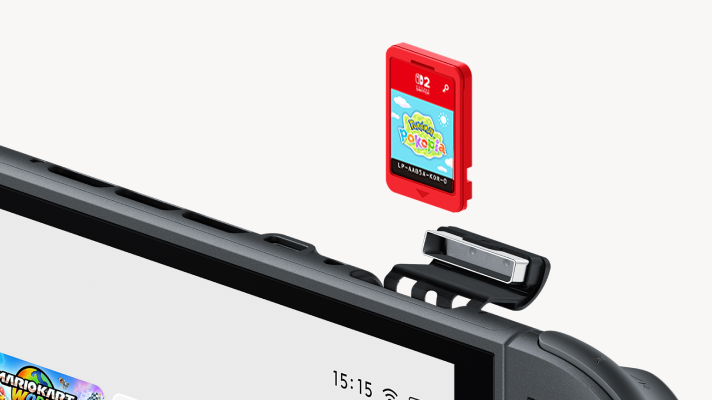
Game-Key Cards and the First Download
A game-key card holds the key to run the game, so on the first console you use it with, the main game data is downloaded over the internet. Even after installation, the card must be inserted when you launch the game. If you are buying it as a gift or packing it before a trip, first check the game-key card label and the required space on the product box. For physical games that need installation, downloading them somewhere with Wi-Fi before you head out makes it easier to start playing right away.
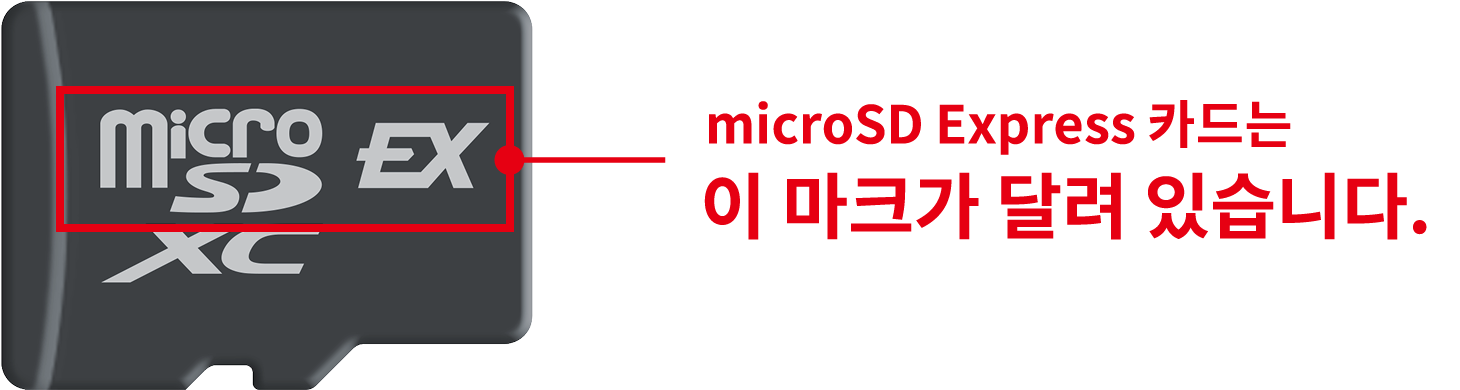
microSD Express Storage
To store games downloaded on Switch 2 on a memory card, you need the microSD Express standard. Even a card you used in your original console cannot be used as-is for installing games on the new console if it is a regular microSD. If your existing card holds screenshots and videos, check the read support that Nintendo Korea describes. Looking for the EX mark on the card along with its capacity can help you avoid buying the wrong one.
Full System Transfer and Save Data
A full system transfer, which moves your existing console's data all at once, is a procedure you use when setting up Switch 2 for the first time. If you have both consoles, you can place them near each other and transfer. Save data, the album, and software may be transferred in different ways, so check Nintendo Korea's transfer guide before you start. It is best not to reset your old console until you have confirmed that you can continue the games you played most.
If you have not bought yet, start by writing down a few of the titles you play most, then check in the official compatibility information whether they run and which features are limited. For titles with a separate edition, looking first at the extra features you actually want to use makes it easier to decide whether you need the upgrade. If the box says game-key card, it is best to check in advance where you will do the first download and how much free space your console has.
Once you receive the console, take care of the account and save data you will transfer first, confirm that you can pick up where you left off in the games you played most, and only then clear out your old console. Even if you keep your old memory card, you need to check separately whether it meets the standard for installing games on the new console. This also eases the pressure of having to buy the console and move your records all at once.
At a glance
5 items
As part of the Coupang Partners program, this post may earn a commission from qualifying purchases.
Comments 0
Log in to leave a comment.
Be the first to comment.
How about these lists?


You might also like


🎲
Not ready to stop here?
Wondering what to read next is the biggest waste of time.
Let the dice decide — you won't know what pops up until you roll.
If you don't press it… won't you wonder forever? 👀